How Does Valley Handle Meeting Booking and Sales Process Progression?

Build a strong pipeline with effective prospect list building by defining ideal customers, using intent data, and personalizing your outreach for better sales.

Real questions from real sales conversations - answered with complete transparency about how Valley actually works.

Valley AI logo on a black background with dynamic LinkedIn automation design.
Black background featuring Valley AI logo with abstract white swirls and modern LinkedIn automation design.
Valley AI logo on a black background with swirling white graphic design.
Saniya

Saniya Sood

Does Valley automatically book meetings with interested prospects?

Valley doesn't automatically book meetings, it assists the process by drafting replies that include calendar links when contextually appropriate, but you must approve these messages before they send. You train Valley on when to send booking links through your writing style and sequence configuration: some users include links in initial messages (particularly InMails), others send links only after qualification questions, and some wait until prospects explicitly express interest.

The assisted-not-automated approach reflects the strategic decision point booking represents. Automatically sending calendar links to every interested response maximizes meeting volume but risks booking poor-fit prospects who waste sales time. Requiring approval for booking messages allows human judgment: "This prospect seems genuinely interested and qualified—approve the booking link," versus "This prospect is fishing for information without buying intent—let's qualify further before offering meeting."

The configuration flexibility accommodates different sales methodologies. Consultative sales teams (complex, high-ticket) typically qualify extensively before booking—3-4 message exchanges confirming budget, authority, need, timeline. Transactional sales teams (simpler, shorter sales cycles) often include calendar links immediately, reducing friction to booking increases conversion more than qualification precision. Valley supports both approaches through writing style instructions and sequence design.

Book a demo and explore how Valley can support your use case

Boosting LinkedIn outreach with vibrant, multicolored abstract backgrounds and smooth organic shapes.

Give your sales team
an unfair advantage.

Valley AI graphic with blended rainbow colors enhancing LinkedIn outreach and AI SDR tools.

Give your sales team
an unfair advantage.

Dramatic blended colors and textured background enhance AI SDR outreach visualizations effectively.

Give your sales team
an unfair advantage.

How does Valley know when prospects are qualified enough for a meeting?

Valley doesn't make qualification decisions autonomously, you configure the criteria. In your writing style, you can specify: "If the prospect responds positively and confirms they have budget/authority/need, send the calendar link. If they ask questions first, answer questions before booking." Valley drafts responses following these instructions, but you approve messages to ensure qualification standards are met before meetings book.

The qualification configuration happens through explicit instructions in your writing style's advanced questions section. Question: "When should calendar links be sent?"

Your answer might specify: "Send calendar link when prospect: (1) explicitly asks for meeting/demo, OR (2) confirms they're actively evaluating solutions in our category, OR (3) asks about pricing/implementation, signals buying intent.

Do NOT send calendar link when prospect: (1) asks generic questions about features without context, OR (2) says 'interesting, tell me more' without specifics, OR (3) responds politely but doesn't signal interest beyond social courtesy."

The judgment layer comes during approval review.

Valley drafts reply with calendar link based on your configured criteria, but you make final call: Does this prospect's response actually signal qualification, or are they being politely responsive without genuine interest? Should I ask one more qualifying question before offering the meeting? Does their company/role match our ICP well enough to warrant sales time? These nuanced judgments require human wisdom that AI can support but not replace.

Can Valley integrate with Calendly or other scheduling tools?

Valley doesn't yet have direct integrations with Calendly, Chili Piper, or similar scheduling tools, this is on the roadmap. Currently, you include your scheduling link in your product section or writing style instructions, and Valley incorporates it into messages when appropriate. Meeting booking must be tracked manually in Valley by tagging prospects as "meeting scheduled," though this information can sync to your CRM through webhooks.

The manual tracking workflow involves: Prospect replies positively → Valley drafts reply with your Calendly link → You approve → Prospect books meeting on Calendly → You receive Calendly confirmation email → You manually tag prospect as "meeting scheduled" in Valley → (If CRM webhook configured) Meeting status syncs to CRM automatically. The tagging step adds 15-30 seconds per booked meeting but ensures Valley's reporting reflects actual meetings booked.

The integration roadmap addresses this friction. Future state: Valley directly integrates with Calendly/Chili Piper → When prospect books meeting, webhook triggers automatic status update in Valley → Meeting details (time, date, attendees) populate in prospect record → Valley automatically stops outbound sequences → CRM receives meeting information automatically. This automation eliminates manual tracking while providing real-time visibility into conversion from conversation to booked meeting.

What's Valley's recommended approach for progressing prospects through the sales funnel?

Valley recommends a qualification-before-booking approach: respond to initial interest by asking 1-2 qualifying questions (confirming fit, budget, timeline, or decision-making authority), then send the calendar link once qualification is confirmed. This prevents wasted meetings with poor-fit prospects. Valley drafts both the qualification questions and the subsequent booking message, maintaining conversation flow without manual writing.

The qualification sequence typically follows 2-3 message pattern.

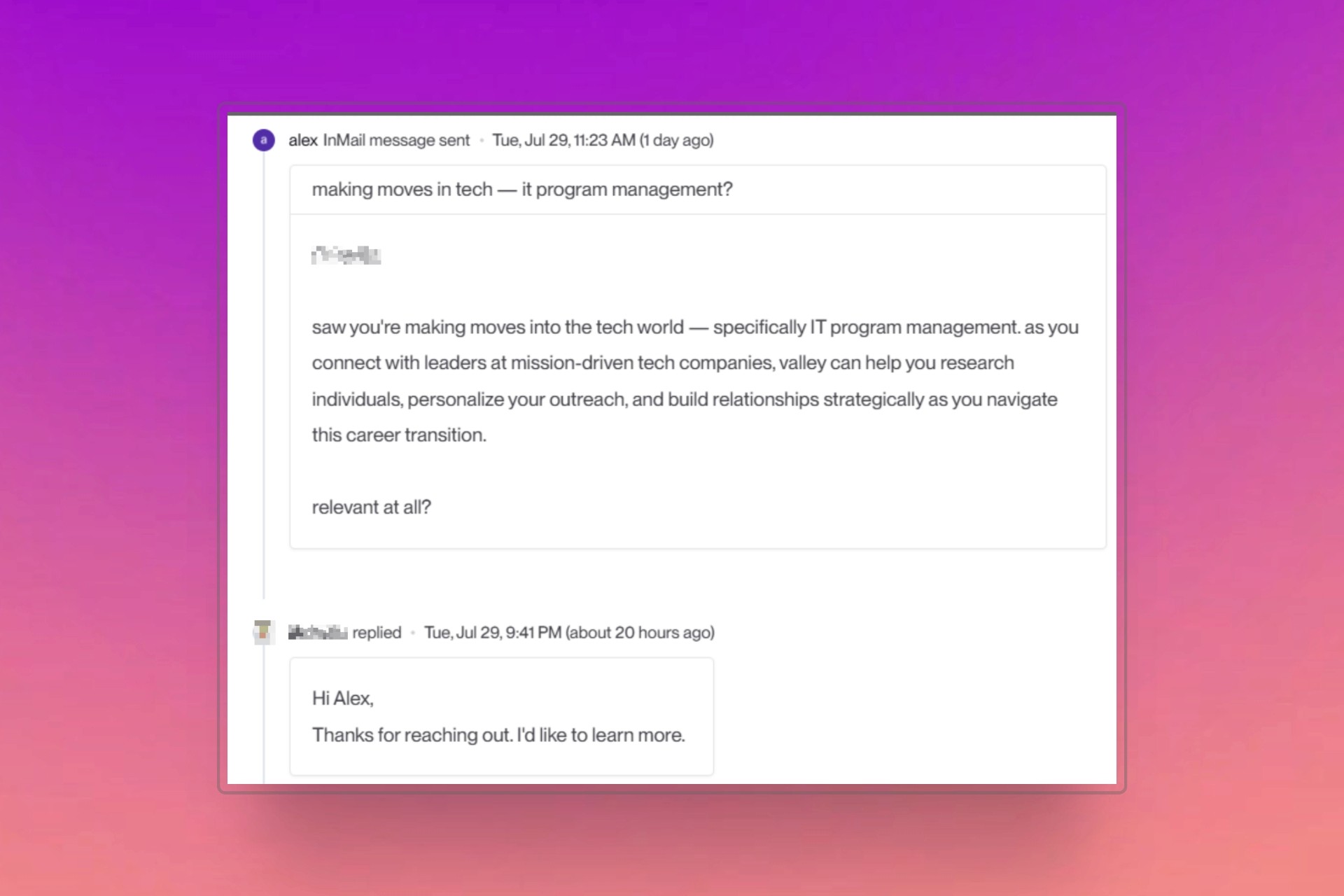
Message 1 (Prospect responds): "This sounds interesting, tell me more."

Message 2 (Your reply drafted by Valley): "Great to hear! Quick questions to make sure we'd be a good fit: (1) Are you currently using [alternative solution] or managing this process manually? (2) What's prompting you to look into solutions like ours right now?"

Message 3 (After they answer, Valley drafts): "Thanks for sharing, sounds like we could definitely help given [specific situation they described]. Here's my calendar if you'd like to explore further: [link]."

The qualification questions serve dual purposes: filtering (identifying poor fits before wasting meeting time) and research (gathering information that helps sales team prepare for productive meeting).

Good qualification questions: "What's your biggest challenge with [relevant area] right now?" "What solutions have you evaluated so far?" "What's your timeline for making a decision?" "Who else would need to be involved in evaluating this?"

These questions reveal fit, urgency, and process while demonstrating genuine interest in their situation versus pitching blindly.


Valley AI


How does Valley handle prospects who show interest but don't book immediately?

Valley's re-engagement sequences automatically follow up with prospects who express interest but don't book. You can configure cadences (for example, 3-5 days after sending the calendar link) for Valley to draft reminder messages like "Just wanted to make sure my previous message didn't get lost" or "Still interested in discussing how we can help with [specific pain point]?" These gentle nudges increase conversion from interest to booked meetings.

The non-booking phenomenon is extremely common, 30-50% of prospects who receive calendar links don't book immediately despite expressing interest. Reasons: they got busy and forgot, they're comparing multiple solutions and haven't decided who to meet with first, they forwarded your link to colleagues for input, they're interested but not urgent. Re-engagement recovers many of these dormant interested prospects who simply needed reminder prompts.

The re-engagement messaging strategy balances persistence with pressure. First reminder (3 days): Gentle, assumptive of interest: "Following up on the calendar link I shared—did you have a chance to find a time that works?" Second reminder (7 days): Value-add approach: "I came across [relevant case study/resource] and thought of our conversation—would still love to connect about [their challenge]. My calendar link is below." Third reminder (14 days): Break-up message: "I haven't heard back, so I'm assuming the timing isn't right. I'll close the loop on my end, but feel free to reach out if circumstances change."

Can Valley route qualified leads to specific sales team members?

Valley doesn't have native lead routing, all responses for a campaign appear in that campaign's inbox. However, you can create separate campaigns for different sales territories, products, or team members, then filter the unified inbox by campaign to segment leads. Alternatively, using CRM webhooks, you can automatically push qualified Valley leads into your CRM's lead routing logic for distribution.

The workaround approaches accommodate different team structures. Small team (1-3 sales people): Everyone accesses unified inbox, responds to leads as they come in, simple tagging prevents duplicate responses. Medium team (4-10 sales people): Create territory-based campaigns (East Coast, West Coast, Midwest), each salesperson manages their territory's campaign inbox. Large team (10+ sales people): Use CRM webhook integration to push leads to Salesforce/HubSpot, leverage CRM's native round-robin or territory-based routing, Valley serves as lead generation source feeding CRM distribution logic.

The native routing feature on Valley's roadmap will enable: prospect tagging by territory/product/segment during campaign creation, automatic routing based on tags (leads matching Territory A automatically route to Sales Rep A's inbox), round-robin distribution (leads distribute evenly across team), and priority routing (high ICP fits route to senior reps, medium fits to junior reps). This built-in routing eliminates the need for workaround approaches and CRM dependencies.

What information does Valley include in meeting reminder messages?

Valley includes whatever context you specify in your writing style. Effective meeting reminders typically reference: the specific topic you discussed, the prospect's pain points or goals mentioned in conversation, what you'll cover in the meeting, and logistical details (date, time, duration). Valley drafts these reminders by reviewing the full conversation history and incorporating relevant context naturally.

The meeting reminder best practices optimize show rates.

Send reminder 24 hours before meeting: "Looking forward to our call tomorrow at 2pm ET, we'll focus on [specific topics you mentioned] and I'll share how [Company Name] has helped similar organizations address [their challenge]."

Send reminder 2 hours before meeting: "Quick reminder about our call at 2pm today, I've prepared some examples specific to [their situation] that I think you'll find valuable." These contextual reminders reduce no-shows significantly versus generic calendar notifications.

Valley's automation streamlines reminder generation but not sending, you must manually schedule reminders or configure them through your calendar system.

Valley drafts the reminder message incorporating conversation context, you copy that message into your Calendly/Calendar settings or send manually via email/LinkedIn.

The drafted content ensures reminders feel personal and relevant rather than generic automated notifications, improving show rates even though the reminder send process itself isn't automated within Valley.

► Check Out Valley's Incredible Outreach: A compilation of real time messages and responses!

Vibrant orange and blue swirling clouds representing AI-driven LinkedIn outreach automation success.

Give your sales team
an unfair advantage.

Valley AI automated LinkedIn outreach teams generate vibrant orange blue swirling liquid clouds.

Give your sales team
an unfair advantage.

AI-powered LinkedIn outreach tools with vibrant colors and liquid clouds design concept in white.

Give your sales team
an unfair advantage.

How does Valley track conversion from initial message to booked meeting?

Valley's dashboard shows campaign metrics including messages sent, response rates, and meetings booked (when manually tagged). You can view these metrics by campaign, time period, or across all campaigns. However, Valley's meeting tracking requires manual tagging currently, you mark prospects as "meeting scheduled" when they book. With CRM integration, this data flows automatically to your reporting tools for more comprehensive analytics.

The manual tracking methodology involves tagging discipline. Best practice: Create tag "Meeting Scheduled" and apply immediately when prospect books via your calendar link. Valley's reporting then shows:


Valley AI SDR


Campaign A: sent 1,000 messages → 95 responded (9.5% reply rate) → 18 tagged as "Meeting Scheduled" (19% of responses converted to meetings, 1.8% of total prospects). These conversion metrics reveal campaign performance and identify optimization opportunities.

The analytics limitations with manual tracking include incomplete data (if you forget to tag meetings, reporting underreports performance) and lack of granular insights (Valley shows meetings booked but not show rates, meeting duration, or conversion to opportunity). CRM integration addresses these gaps, once meetings sync to CRM, your CRM's reporting shows complete funnel:

Valley messages → Responses → Meetings booked → Meetings held → Opportunities created → Deals closed.

This comprehensive visibility attributes revenue to Valley activities accurately.

► Here's the Valley Warm Outbound Launch Video

Gray, gold, and white marble texture with AI-enhanced sparkles and modern LinkedIn outreach vibes.

Give your sales team
an unfair advantage.

Valley AI's AI SDR boosts LinkedIn outreach with automated marbled background design elements.

Give your sales team
an unfair advantage.

Elegant gray, gold, and white marble pattern with smooth texture and AI-inspired designs.

Give your sales team
an unfair advantage.

frequently Asked Questions

frequently Asked Questions

FAQ

FAQ

Which channels does Valley support?

Valley supports LinkedIn outreach, including connection requests and InMails. Valley users safely send 1000-1200 messages per seat every month.

How safe is it and does Valley risk my LinkedIn account?

Do I have to commit to an Annual Plan like other AI SDRs?

How does Valley personalize messages?

Background demonstrating AI-powered LinkedIn automation tools for Sales Development effectiveness training.
Blank LinkedIn background for AI-driven SDR outreach and automation purposes only display.
Background illustration for AI SDR, LinkedIn outreach, and automation marketing strategies

VALLEY MAGIC

The LinkedIn tool that floods
your inbox (with real replies).

The LinkedIn tool that floods your inbox (with real replies).

Messages

Search messages

man standing near white wall

Jason Burman

5:14 AM

Jason: Sound great, send me your calendar

1

woman in white crew neck shirt smiling

Katy Jones

3:24 AM

Katy: Okay, tell me more

1

man in blue crew neck shirt

Buddy Rich

5:24 AM

Buddy: Ah, smart catch. Let me know more.

1

men's gray crew-neck shirt

Tommy Karl

8:24 PM

Tommy: Super folks. What a message! Let's..

1

man wearing eyeglasses

Kanan Gill

6:30 PM

Kanan: What's your pricing?

1

man wearing white crew-neck shirt outdoor selective focus photography

Kaleb Sal

1:24 PM

Kaleb: Now that's a refreshing outreach…

1

closeup photography of woman smiling

Maggie Jones

2:00 AM

Maggie: Haha, almost didn't catch that. let's..

1

man in green crew neck shirt and black hat

Alfn Crips

5:24 AM

Alfn: Sound great, send me your calendar

1

Messages

Search messages

man in green crew neck shirt and black hat

Jack Jones

5:24 AM

Jack: Let's gooo. Let's take it forward.

1

man standing near white wall

Jason Burman

5:14 AM

Jason: Sound great, send me your calendar

1

woman in white crew neck shirt smiling

Katy Jones

3:24 AM

Katy: Okay, tell me more

1

man in blue crew neck shirt

Buddy Rich

5:24 AM

Buddy: Ah, smart catch. Let me know more.

1

men's gray crew-neck shirt

Tommy Karl

8:24 PM

Tommy: Super folks. What a message! Let's..

1

man wearing eyeglasses

Kanan Gill

6:30 PM

Kanan: What's your pricing?

1

man wearing white crew-neck shirt outdoor selective focus photography

Kaleb Sal

1:24 PM

Kaleb: Now that's a refreshing outreach…

1

closeup photography of woman smiling

Maggie Jones

2:00 AM

Maggie: Haha, almost didn't catch that. let's..

1

man in green crew neck shirt and black hat

Alfn Crips

5:24 AM

Alfn: Sound great, send me your calendar

1