How Does Valley Qualify Leads Automatically?

Try Valley
Make LinkedIn your Greatest Revenue Channel ↓

Saniya
Published:
How Does Valley's Automatic Lead Qualification Work?
Manual lead qualification consumes hours of sales team capacity: researching company size, validating job titles, confirming budget authority, assessing problem fit, and determining sales-readiness. Valley automates this entire workflow through AI-powered qualification that scores every prospect against your ICP criteria within seconds of signal capture.
Traditional qualification follows a linear process: a lead enters your system (form fill, list upload, scraped contact), someone manually researches the company and role, the lead gets assigned a subjective quality rating, qualified leads move to outreach while unqualified leads sit in limbo, and the process repeats for every single prospect.
This manual approach creates bottlenecks: only 10-20% of captured leads get researched thoroughly, qualification standards vary by who's reviewing, low-quality leads waste outreach capacity, and high-quality leads get lost in backlogs.
Valley transforms qualification from manual bottleneck to automatic filter that processes hundreds of prospects simultaneously with consistent criteria, scores every lead objectively against defined parameters, surfaces best-fit prospects for immediate attention, and routes okay-fit prospects to nurture sequences automatically.
The platform doesn't just answer "is this a qualified lead?" It answers "how qualified is this lead and why?" with transparent reasoning that helps teams refine targeting over time.
► Book a demo and explore how Valley can support your use case

What ICP Criteria Does Valley Use for Lead Qualification?
Effective qualification requires multi-dimensional evaluation across firmographics, role characteristics, behavioral signals, and timing factors. Valley evaluates prospects holistically rather than using single-factor filters.
Firmographic Qualification: Valley assesses company-level fit through company size (employee count), industry and vertical, geographic location and headquarters, funding stage and growth trajectory, revenue estimates where available, and technology stack and existing tools.
You define acceptable ranges for each criterion: "50-500 employees in B2B SaaS, headquartered in North America or Western Europe, Series A-C funding." Valley automatically scores companies against these parameters.
Role-Based Qualification: Beyond company fit, Valley evaluates individual prospect relevance: job title and seniority level, functional department (sales, marketing, operations, finance), decision-making authority (economic buyer vs influencer), tenure in role (new to role vs established), and LinkedIn activity level (active vs dormant accounts).
A VP of Sales at a perfectly-fit company scores higher than an SDR at the same company because the VP has budget authority and strategic decision-making power.
Behavioral Signal Qualification: Signal quality dramatically impacts conversion likelihood: multiple signal types (profile view + post engagement + website visit) indicate higher intent than single signals, repeated signals over time (viewed profile 3 times) show sustained interest, recent signals (this week) matter more than old signals (last quarter), and high-intent pages visited (pricing, case studies) beat low-intent pages (about us, careers).
Valley weights these behavioral factors when scoring qualification, recognizing that perfect ICP fit with weak signals converts worse than strong ICP fit with strong signals.
Timing and Trigger Qualification: Valley identifies trigger events that create buying urgency: recent funding announcements, new executive hires, company expansion or relocation, product launches or rebrands, competitor wins or losses mentioned publicly, and regulatory changes affecting their industry.
Prospects with active triggers score higher because they're more likely to be evaluating solutions now rather than in six months.
Exclusion Criteria: Valley automatically disqualifies prospects matching exclusion rules: competitors in your space, existing customers, companies with active NDA or partnership agreements, public profiles (low quality), and accounts on your DNC list.
These automatic exclusions prevent wasted outreach and potential relationship damage.
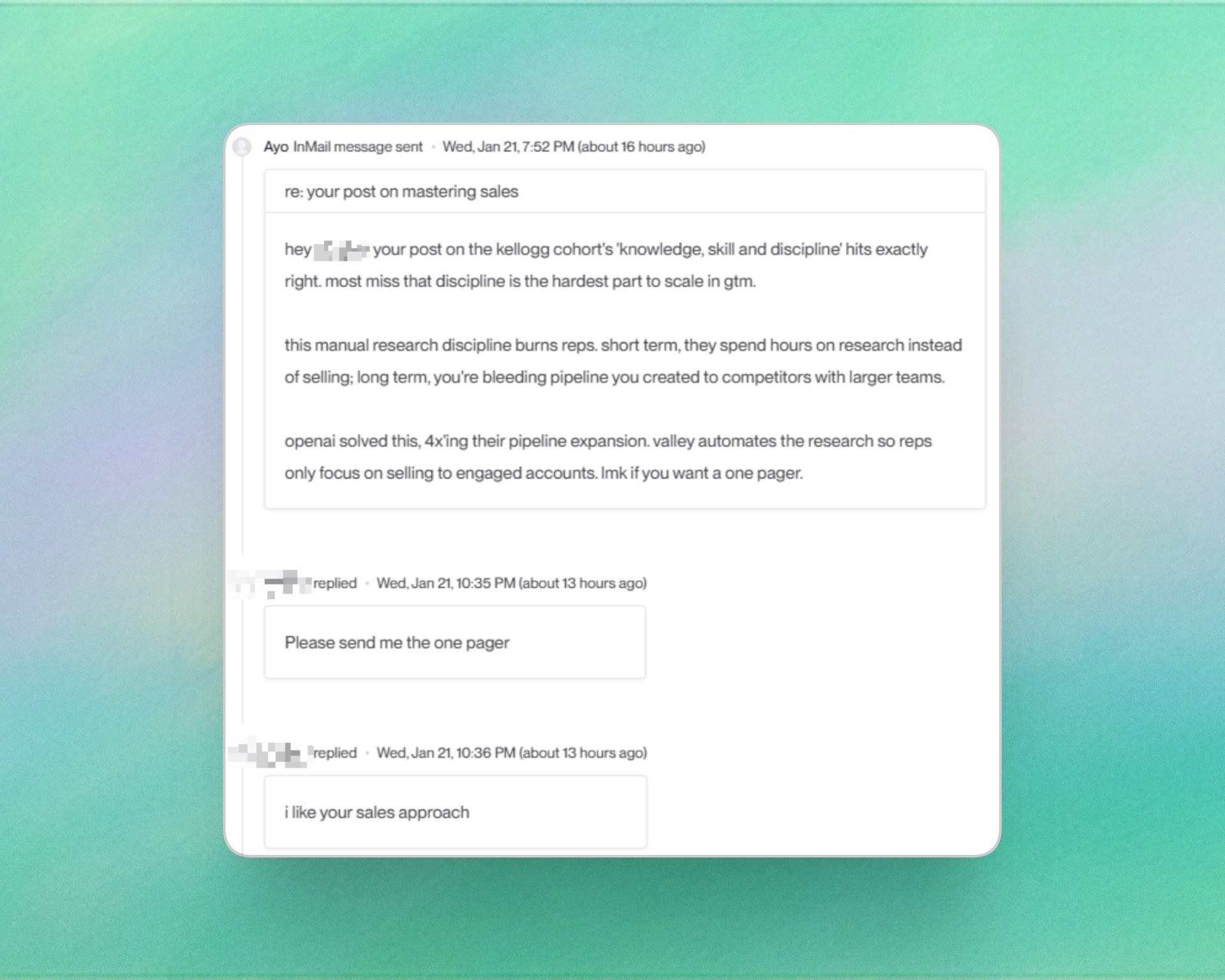
► Check Out More of Valley's Incredible Outreach: A compilation of real time messages and responses!
How Does Valley Score Leads as Best Fit, Okay Fit, or Not a Fit?
Valley's three-tier classification system provides clear prioritization guidance while maintaining transparency about why each prospect receives their score.
Best Fit (Score 80-100): Prospects meeting all or nearly all ICP criteria with strong behavioral signals. These represent your highest conversion probability and deserve immediate attention.
Example: VP of Sales at 200-person Series B SaaS company in target industry, viewed your profile 3 times this week, engaged with 2 posts about warm outbound, visited pricing page—Score 92.
Valley automatically routes best-fit prospects to immediate outreach campaigns with high personalization and sales rep attention.
Okay Fit (Score 50-79): Prospects meeting most ICP criteria but with gaps or weaker signals. These have conversion potential but lower probability than best-fit prospects.
Example: Director of Sales Operations at 300-person company in adjacent industry, liked one post, viewed profile once—Score 64.
Valley routes okay-fit prospects to automated nurture sequences or lower-touch campaigns, conserving manual effort for best-fit prospects.
Not a Fit (Score Below 50): Prospects failing to meet minimum ICP requirements or showing characteristics that predict low conversion.
Example: SDR at 20-person early-stage startup outside target industry, one profile view, no other engagement—Score 35.
Valley automatically excludes not-a-fit prospects from outreach campaigns, preventing wasted capacity on low-probability leads.
Score Transparency and Reasoning: For every prospect, Valley displays the qualification score prominently and provides detailed reasoning explaining which criteria the prospect meets or misses, why they received their specific score, what signals contributed to the qualification, and which factors reduced or elevated their priority.
This transparency helps teams understand pipeline composition and identify patterns in which prospect types actually convert to meetings and deals.

How Does Valley's Qualification Compare to Manual Research?
The speed, consistency, and depth advantages of automated qualification become clear when comparing Valley's approach to traditional manual research.
Speed Comparison: Manual qualification: 5-15 minutes per prospect to research company, validate role, assess fit, document findings, and assign score.
With 100 new prospects weekly, this represents 8-25 hours of research time—one person's nearly full-time job or distributed burden reducing team selling capacity.
Valley qualification: 30-60 seconds per prospect automatically, with zero human effort required. 100 prospects qualified in 1-2 hours total processing time, all happening in the background while your team focuses on conversations.
Consistency Comparison: Manual qualification varies by who's reviewing: optimistic reps over-qualify marginal prospects, conservative reps under-qualify good prospects, qualification standards drift over time without documentation, and subjective judgment creates inconsistency.
Valley applies identical criteria to every prospect: same scoring rubric every time, no mood-based variations, documented reasoning for every decision, and consistent standards that improve through feedback rather than drift.
Depth Comparison: Manual research typically covers company size and industry, job title verification, and LinkedIn profile review—basics that take 5 minutes but miss crucial context.
Valley's automated research analyzes 25+ data sources: recent company news and announcements, funding and growth trajectory, technology stack and integrations, hiring patterns and team expansion, competitive positioning and market presence, executive team backgrounds, blog content and thought leadership, customer case studies and reviews, social media presence and activity, and industry trends and challenges.
This depth reveals insights manual researchers would need 20-30 minutes to discover—insights Valley surfaces automatically for every prospect.
Accuracy Comparison: Manual research relies on researcher skill: junior reps make mistakes in company size estimation, role assessment, and fit evaluation. Even experienced researchers miss information or misinterpret signals.
Valley's AI processes structured data consistently: firmographic data from verified business databases, LinkedIn profile information directly from the platform, website and public information algorithmically analyzed, and behavioral signals tracked systematically.
While not perfect, automated qualification reduces human error significantly.
How to Configure Valley's Lead Qualification for Your ICP?
Effective automated qualification requires thoughtful setup that captures your unique ICP definition and qualification criteria.
Step 1: Define ICP Parameters in Valley's Product Section Create detailed buyer personas including company size ranges (e.g., 50-500 employees), target industries and verticals, geographic focus areas, funding stage requirements (e.g., Series A-C preferred), technology stack indicators (e.g., must use Salesforce or HubSpot), and role titles and seniority levels.
Be specific but not overly restrictive: "VP Sales, SVP Sales, Head of Sales, Chief Revenue Officer" captures variations while maintaining role focus.
Step 2: Establish Scoring Weights Not all criteria matter equally. Configure Valley to weight factors by importance to your business: company size might be most critical (weight 30%), industry second (weight 25%), role third (weight 20%), signals fourth (weight 15%), and geography fifth (weight 10%).
These weights determine how Valley calculates composite scores and whether prospects with mismatches on less-important criteria still qualify.
Step 3: Set Minimum Thresholds Define hard requirements that disqualify prospects regardless of other factors: minimum company size (e.g., must be 20+ employees), excluded industries (e.g., no government, non-profit, or education), geographic restrictions (e.g., North America only), and required signals (e.g., must have at least one LinkedIn signal).
Valley automatically excludes prospects failing these minimum thresholds before calculating scores.
Step 4: Configure Exclusion Lists Upload lists of companies and individuals to automatically exclude: competitors and their employees, existing customers, partners with channel agreements, and any company on your DNC list.
Valley checks every prospect against these exclusions in real-time.
Step 5: Enable Learning and Refinement Mark prospects as "good qualification" or "poor qualification" as they progress through your funnel. Valley's AI learns from this feedback to refine scoring over time, improving accuracy through machine learning.
If prospects scoring 70-75 consistently convert well while those scoring 85+ surprisingly don't, Valley adjusts weights to better predict your actual conversion patterns.
Step 6: Test and Iterate Run qualification on a sample of past leads to validate scoring accuracy. Review best-fit, okay-fit, and not-a-fit classifications to ensure they align with your judgment. Adjust criteria and weights based on results, then deploy to live campaigns.
Proper configuration transforms Valley from generic automation into a qualification engine tuned specifically to your business.
What Happens to Prospects Who Don't Qualify?
Not every captured signal represents a qualified opportunity—and that's valuable information. Valley's handling of unqualified prospects prevents wasted outreach while preserving potential future value.
Automatic Exclusion from Outreach: Prospects scoring below your minimum threshold (typically 50) never enter outreach campaigns. Valley automatically filters them out, preventing message sends to poor-fit prospects who would never convert.
This exclusion protects your LinkedIn account from spam patterns (sending messages to obviously irrelevant prospects) and preserves outreach capacity for qualified leads.
Retention for Future Re-Qualification: Valley retains unqualified prospect records rather than deleting them. If prospects show additional signals later (engage with new content, visit website again, view profile multiple times), Valley re-qualifies them automatically.
A prospect who initially scored 45 (not qualified) but later engages with three posts and visits pricing twice might jump to 78 (okay fit), triggering campaign inclusion.
Content Audience Building: While unqualified for sales outreach, these prospects may still benefit from your content. Export unqualified prospect lists to build LinkedIn content audiences, ensuring your posts reach people who showed interest even if they're not sales-ready.
Over time, consistent content engagement can convert unqualified prospects into qualified ones as their situations change.
Market Intelligence: Analyzing unqualified prospect patterns reveals market insights: which industries show interest but don't fit your current ICP (potential expansion opportunities), which roles engage but lack authority (influencers to potentially target), and which companies are interested but too small/large (future prospects if you expand market focus).
Feedback Loop for ICP Refinement: If many unqualified prospects convert surprisingly well, your ICP definition might be too narrow. If many qualified prospects fail to convert, your criteria might be too broad or miss important factors.
Valley's transparent qualification with outcomes tracking helps you refine ICP over time based on actual conversion data rather than assumptions.

Related Blogs

FEATURED READ
5 min
Valley vs HeyReach: Which LinkedIn Outreach Tool Wins More Qualified Meetings?
Read
Read

FEATURED READ
5 min
Valley in 2026: Is the Price Worth the Pipeline?
Read
Read

FEATURED READ
5 min
Valley vs Dripify: Which LinkedIn Outreach Tool Actually Converts in 2026?
Read
Read

FEATURED READ
5 min
Valley vs. Hiring an SDR: The Real Cost and ROI Breakdown for 2026
Read
Read
Which channels does Valley support?
Valley supports LinkedIn outreach, including connection requests and InMails. Valley users safely send 1000-1200 messages per seat every month.
How safe is it and does Valley risk my LinkedIn account?
Do I have to commit to an Annual Plan like other AI SDRs?
How does Valley personalize messages?
Is Valley available in my country?

VALLEY MAGIC





