How Does Valley's Campaign Creation and Management Work?

Try Valley
Make LinkedIn your Greatest Revenue Channel ↓

Saniya
Published:
How Long Does Valley Take to Set Up Initially?
Valley's setup process is remarkably streamlined, requiring 30 minutes to 2 hours total. The product section takes 15-30 minutes - you load your website, and Valley generates initial summaries of your ICP, value propositions, pain points, and proof points, which you then refine. Writing style configuration takes 15-30 minutes using Valley's preset styles or loading your own examples.
Campaign creation adds 15-30 minutes for list upload and configuration. Many users complete everything in under an hour, though some spend additional time perfecting their setup. Valley provides templates, presets, and AI assistance throughout, making setup intuitive even for first-time users.
► Book a demo and explore how Valley can support your use case
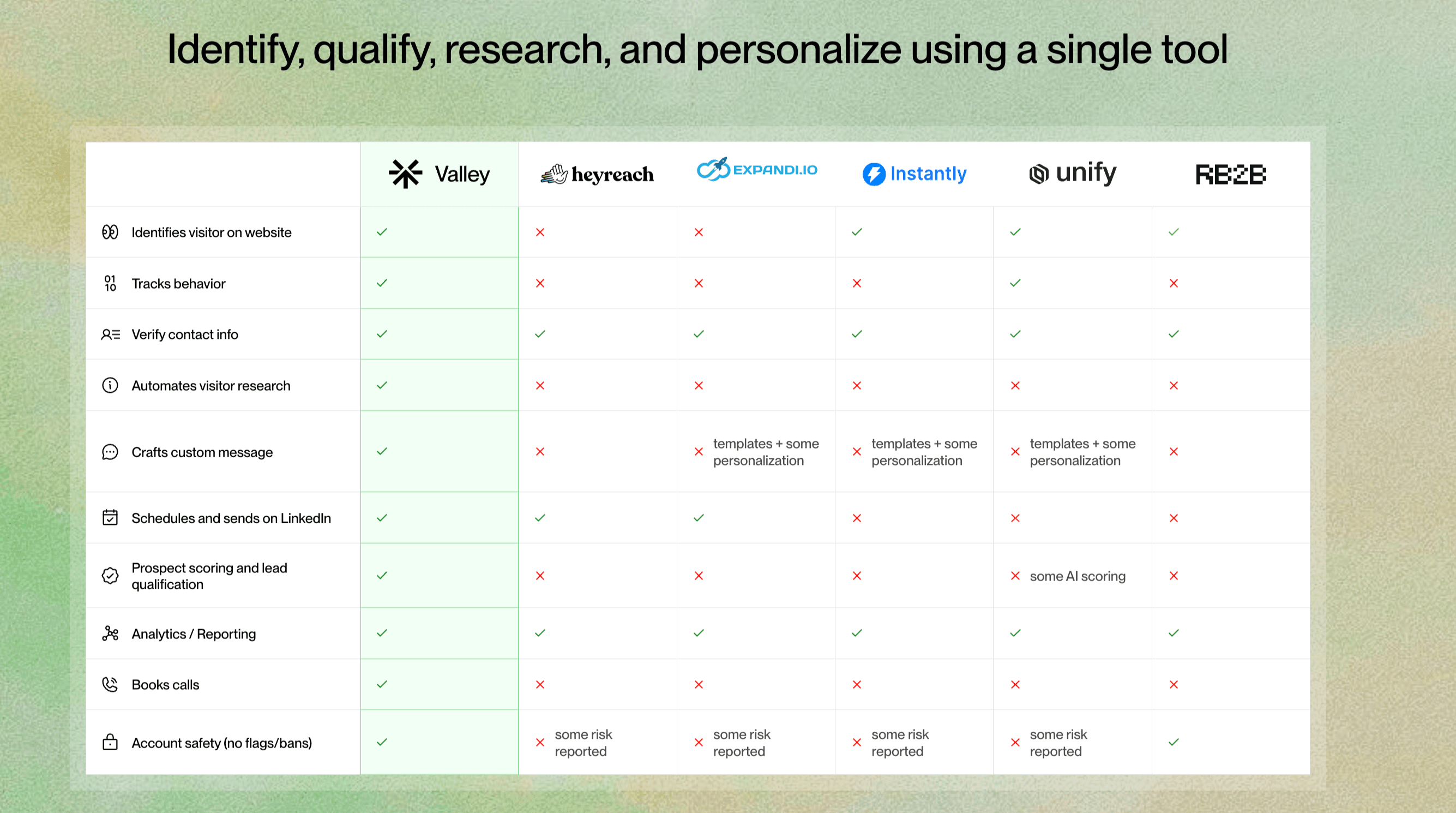

Can Valley Run Multiple Campaigns Simultaneously?
Valley supports unlimited concurrent campaigns without performance degradation. Users commonly run 4-6 campaigns simultaneously: connection requests to different ICPs, InMails to various segments, warm lists for profile viewers, post engager campaigns for competitive intelligence, and geographic or industry-specific campaigns.
Agencies successfully manage 10-15 client campaigns simultaneously through Valley. Each campaign maintains its unique voice, targeting, and messaging strategy. The platform handles scheduling and volume management across all campaigns, ensuring you never exceed LinkedIn's safety limits even with multiple active campaigns.
What's the Difference Between Valley Products and Campaigns?
Products in Valley define what you're selling - your ICP, value propositions, pain points, and proof points. You create different products for different offerings or customer segments. Campaigns are the actual outreach executions using those product definitions.
One product can fuel multiple campaigns targeting different lead sources or using different approaches. Conversely, multiple products can target the same prospect list with different messaging. This separation enables sophisticated go-to-market strategies while maintaining simple campaign management.
How Does Valley's Autopilot Feature Work?
Valley's autopilot automates initial outreach while maintaining quality control. When enabled, autopilot sends your daily sequence volume (25-30 connection requests, 30-40 InMails) automatically without requiring manual approval. Messages are sent throughout the day at optimal times to appear natural.
However, autopilot only handles initial sequences. When prospects respond, Valley drafts replies but requires manual approval before sending. This balance ensures quality control for delicate conversations while automating repetitive initial outreach. Users report autopilot saves 15-45 minutes daily while maintaining response rates within 1-2% of manual approval.
Can Valley Handle Different Writing Styles for Different Campaigns?
Valley supports unlimited writing styles, allowing complete customization per campaign, audience, or sender. You might create formal styles for enterprise executives, casual styles for startup founders, technical styles for engineering leaders, and industry-specific styles for vertical markets.
Each campaign can use different writing styles while maintaining consistent quality. Agencies particularly value this feature, maintaining distinct voices for each client. Valley learns from examples you provide, capturing nuances like capitalization preferences, emoji usage, sentence length, and signature styles.

How Does Valley Manage Follow-Up Sequences?
Valley's follow-up sequences adapt based on recipient behavior. For connection requests, Valley supports unlimited follow-ups with customizable timing. You set the number of follow-ups and days between each. If prospects accept but don't respond, follow-ups continue. If they respond, sequences pause immediately.
InMails work differently - they're single-touch only due to LinkedIn limitations. Valley maximizes this one opportunity through deep personalization. Follow-up messages evolve naturally rather than repeating - the first might reference recent activity, the second shares relevant insights, the third suggests future reconnection.
What Lists and Data Sources Can Valley Import?
Valley accepts prospects through four primary methods. Sales Navigator URLs - copy and paste search URLs directly, importing up to 2,000-3,000 prospects at once. CSV/Excel uploads - import from any source with LinkedIn URLs included. LinkedIn post URLs - scrape all engagers from specific posts. Automatic warm lists - profile viewers and post engagers added continuously.
Valley requires LinkedIn profile URLs for all prospects. Most modern tools include these automatically, but Valley can provide workarounds for older databases. The platform processes all sources identically: deep research, ICP scoring, and personalized message generation regardless of origin.

Related Blogs

FEATURED READ
5 min
Valley vs HeyReach: Which LinkedIn Outreach Tool Wins More Qualified Meetings?
Read
Read

FEATURED READ
5 min
Valley in 2026: Is the Price Worth the Pipeline?
Read
Read

FEATURED READ
5 min
Valley vs Dripify: Which LinkedIn Outreach Tool Actually Converts in 2026?
Read
Read

FEATURED READ
5 min
Valley vs. Hiring an SDR: The Real Cost and ROI Breakdown for 2026
Read
Read
Which channels does Valley support?
Valley supports LinkedIn outreach, including connection requests and InMails. Valley users safely send 1000-1200 messages per seat every month.
How safe is it and does Valley risk my LinkedIn account?
Do I have to commit to an Annual Plan like other AI SDRs?
How does Valley personalize messages?
Is Valley available in my country?

VALLEY MAGIC





