How Does Valley's Support, Onboarding, and Training Work?

Try Valley
Make LinkedIn your Greatest Revenue Channel ↓

Saniya Sood
Published:
What onboarding support does Valley provide to new customers?
Valley's onboarding varies by plan tier. The Growth plan (three or more seats) includes a 45-minute onboarding call with a dedicated customer success manager who helps connect accounts, set up your Studio (products and writing styles), configure initial campaigns, and establish best practices. The Base plan (single seat) is self-serve with documentation, video tutorials, an AI support agent, and email/chat support available.
The tiered onboarding approach recognizes different customer needs and investment levels. Single-seat users (often solo founders, consultants, or individual SDRs) typically prefer self-serve approaches; they're comfortable with technology, don't want to wait for scheduled calls, and value autonomy over hand-holding. Multi-seat users (agencies, sales teams, enterprises) benefit from guided onboarding—they're coordinating multiple stakeholders, implementing across teams, and need strategic guidance beyond technical setup.
The 45-minute onboarding call structure follows proven framework: Minutes 0-10: Account connection and technical setup (connect LinkedIn accounts via extension, verify authentication). Minutes 10-25: Studio configuration (define first product/ICP, set up initial writing style using preset templates, customize with your examples). Minutes 25-35: First campaign creation (upload small test list, configure research agents, set sequence parameters). Minutes 35-45: Best practices and Q&A (daily management workflow, response handling, scaling strategies, questions specific to your situation). This structured approach ensures new customers achieve initial success quickly.
► Book a demo and explore how Valley can support your use case


How long does it typically take to set up Valley and launch the first campaign?
Most users can launch their first campaign within 30-60 minutes if they approach setup strategically. The fastest path: choose a preset writing style (like Valley's own), let Valley summarize your website for the product section, upload a small test list (100-200 prospects), select three recommended research agents, and launch in manual mode to review messages. Full optimization with custom writing styles and refined ICP criteria typically takes 1-2 hours total.
The quick-start methodology prioritizes action over perfection. Traditional approach: spend 3-4 hours perfecting writing style, meticulously defining ICP criteria, building comprehensive prospect lists, then launch after days of preparation. Quick-start approach: spend 30 minutes on minimum viable configuration, launch small test campaign (100-200 prospects), review actual generated messages, refine based on real output, expand once satisfied. The second approach produces learning faster through iteration rather than planning.
The time allocation breakdown for 60-minute setup: 10 minutes connecting LinkedIn account and navigating Valley interface, 15 minutes configuring product section (ICP criteria, value props, pain points), 20 minutes setting up writing style (selecting preset, adding 3-5 examples, customizing key do's/don'ts), 10 minutes creating first campaign (uploading prospects, selecting research agents, configuring sequence), 5 minutes reviewing sample messages and launching. This structured allocation prevents getting stuck perfecting any single section; move through all sections at "good enough" level, then iterate based on results.
Does Valley provide weekly office hours or ongoing training?
Valley offers weekly office hours for Growth plan customers where you can join group calls to ask questions, troubleshoot issues, and learn best practices from Valley's team and other customers. These sessions cover topics like advanced writing style configuration, campaign optimization strategies, interpreting analytics, and upcoming feature previews. Single-seat customers can access recorded training content and written resources instead.
The office hours format provides community learning beyond one-on-one support. Typical session: 5-10 customers join Zoom call, each shares current challenges or questions, Valley team addresses each issue live, all participants learn from others' questions and solutions. This peer learning dynamic often provides more value than individual support—you learn not just answers to your questions but also approaches you hadn't considered from hearing others' situations.
The recurring topics in office hours reveal common optimization opportunities. Frequent discussions: writing style refinement (customers share what's working, Valley team provides feedback on message examples), ICP scoring accuracy (how to set criteria that properly filter prospects), warm outbound strategies (maximizing profile viewers and post engagers), response management efficiency (handling high reply volumes without overwhelming team), integration questions (connecting Valley with CRMs and other tools). These recurring themes create institutional knowledge shared across the customer base.
► Check Out More of Valley's Incredible Outreach: A compilation of real time messages and responses!
What resources does Valley provide for learning the platform independently?
Valley maintains an extensive knowledge base with articles covering every feature, video tutorials demonstrating workflows, case studies showing successful customer implementations, and an AI support agent built into the platform that answers questions using Valley's documentation. The AI agent can provide step-by-step instructions, troubleshoot common issues, and explain features contextually based on where you are in the platform.
The knowledge base structure mirrors typical user journeys. Getting Started section: Account setup, LinkedIn connection, first campaign creation, basic navigation.
Core Features section: Writing style configuration, product/ICP setup, research agent selection, campaign types, inbox management.
Advanced Topics section: Multi-account management, CRM integration, team collaboration, performance optimization.
Troubleshooting section: Connection issues, message quality problems, technical errors, billing questions. This structured organization helps users find relevant information based on their current need without wading through irrelevant content.
The AI support agent represents Valley's innovation in customer support automation. Traditional chatbots: keyword matching with canned responses, frustrating when questions don't match exact scripts.
Valley's AI agent: understands natural language questions, accesses complete documentation dynamically, provides contextually relevant answers considering where you are in the platform.
Example interaction: User clicks "Create Campaign" button, encounters confusion, clicks support chat, asks "How do I upload prospects?", AI agent responds with specific instructions for the campaign creation screen they're currently viewing rather than generic documentation links.
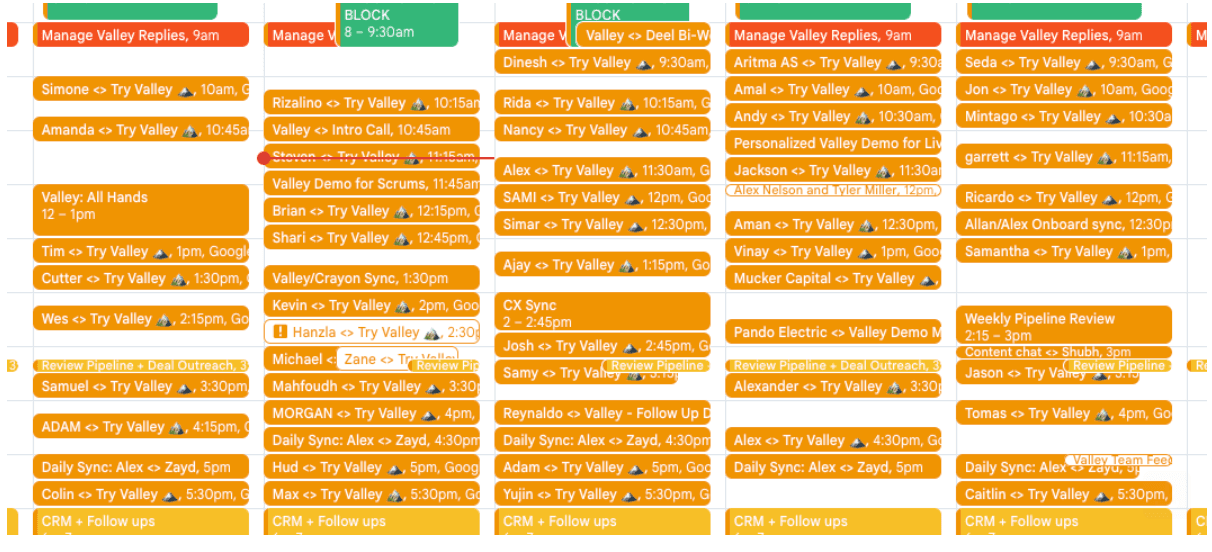
How calendar looks with Valley running on Autopilot:

Can Valley's team help build my initial prospect lists?
Valley doesn't build lists as a standard service—the platform is software, not a done-for-you agency. However, during onboarding calls for Growth plan customers, Valley's team demonstrates list-building techniques using Sales Navigator, suggests tools like Sero for generating search URLs, and reviews your ICP criteria to recommend optimal filtering strategies. The goal is teaching you repeatable list-building processes rather than one-time list delivery.
The teach-to-fish philosophy reflects Valley's positioning as a platform rather than service. Service provider approach: "Tell us your ICP, we'll build your lists for you, you pay monthly for ongoing list delivery." Platform approach: "We'll teach you how to build lists efficiently, you own the skill, you can build unlimited lists without depending on us." The platform approach creates customer autonomy and avoids the vendor lock-in inherent in service-based list building.
The list-building training during onboarding covers: Sales Navigator search construction (using boolean logic, title filters, company size filters, geography filters), saved search management (creating repeatable searches that update automatically), CSV preparation (formatting exported lists for Valley import), post URL scraping (identifying high-engagement posts and extracting engager lists), and hybrid approaches (combining multiple sources for comprehensive coverage). This comprehensive training enables customers to source prospects independently using multiple methodologies.
What level of support is available when I encounter problems or have questions?
All plans include in-app chat support and email support with typical response times under 24 hours. Growth plan customers also have access to their dedicated CSM for priority support and can schedule one-on-one calls as needed. The support team can review your workspace configuration, troubleshoot technical issues, provide strategic campaign advice, and escalate feature requests or bugs to Valley's product team.
The support channel hierarchy optimizes response speed and resource allocation.
Tier 1 (AI support agent): Handles common questions with immediate responses; account setup, feature explanations, navigation help.
Tier 2 (Email/chat support): Human support team addresses questions the AI couldn't resolve, typically within 4-24 hours.
Tier 3 (CSM for Growth customers): Dedicated manager provides personalized support with faster response times and strategic guidance.
Tier 4 (Engineering escalation): Technical issues requiring code changes escalate to engineering team. This tiered system ensures most questions get immediate answers while complex issues receive appropriate expertise.
The support quality metrics Valley tracks include: first response time (how quickly customers receive initial reply), resolution time (how long until issue is fully resolved), customer satisfaction scores (rating of support interaction), and escalation rates (what percentage of tickets require engineering involvement).
These metrics drive continuous support improvement; if first response times increase, Valley adds support capacity; if satisfaction scores drop, Valley enhances training; if escalation rates spike, Valley improves documentation to prevent common issues.
Does Valley offer account management for complex implementations?
For larger implementations (10+ seats or enterprise customers), Valley assigns dedicated account management beyond standard customer success support. Account managers help with strategic planning, coordinate with your RevOps and sales leadership, provide customized training for your team, and ensure your Valley deployment aligns with broader go-to-market strategies. This white-glove approach is typically reserved for significant accounts.
The enterprise account management scope extends beyond technical support to strategic partnership. Quarterly business reviews: Assess performance metrics, identify optimization opportunities, align on expansion plans. Custom training programs: Tailored workshops for your team covering Valley features relevant to your specific use cases. Integration planning: Coordinate with your IT/RevOps teams to integrate Valley with your tech stack. Executive reporting: Provide performance summaries formatted for your leadership team. This comprehensive support treats large customers as strategic partners rather than transactional users.
The account manager responsibilities include: serving as single point of contact (no ticket queue confusion), proactive health monitoring (identifying issues before customers report them), feature roadmap influence (advocating for customer-requested features in product planning), and expansion planning (helping customers scale from 10 to 20 to 50+ seats strategically). This dedicated resource creates customer success alignment—the account manager's success depends on your success, creating incentive alignment beyond transactional support.
How does Valley handle feature requests and product feedback?
Valley actively solicits customer feedback and maintains a public roadmap of upcoming features. You can submit feature requests through in-app chat, during office hours, or via your CSM. Valley's product team prioritizes features based on customer demand—for example, first-degree outreach (messaging existing connections) became the top-requested feature and is being developed in Q1 2025 because customers consistently asked for it.
The product feedback loop involves multiple collection channels. Passive collection: In-app analytics track which features customers use most, where they encounter friction, which workflows they abandon. Active collection: Post-interaction surveys ask "How was your experience?", NPS surveys measure overall satisfaction and collect improvement suggestions, office hours discussions reveal pain points and desired capabilities. Direct collection: CSMs aggregate feedback from their accounts, support tickets reveal feature gaps causing confusion, sales team reports features that prospects request during evaluations.
The prioritization framework balances customer requests against strategic product vision. High-priority features: Requested by many customers (broad demand), address significant pain points (high impact), align with product strategy (coherent with platform direction), and technically feasible (can be built without architecture overhaul). Low-priority features: Requested by few customers (niche demand), nice-to-have versus must-have, strategically tangential (doesn't advance core vision), or technically complex (requires disproportionate engineering resources). This framework ensures Valley builds features creating most value for most customers rather than accommodating every individual request.
What happens if Valley isn't working as expected after the initial setup?
Contact Valley's support team immediately through in-app chat or email. Common issues include: writing style needing refinement (support can review your configuration and suggest improvements), ICP scoring not matching expectations (adjust criteria in product section), or technical connection problems (support can troubleshoot authentication or campaign issues). The Growth plan guarantee—10 meetings in 90 days or the tool is free—provides additional protection.
The troubleshooting methodology follows diagnostic framework. Step 1 (Symptom identification): What specifically isn't working? (low reply rates, poor message quality, technical errors). Step 2 (Root cause analysis): Why is this happening? (writing style misconfigured, ICP too broad, LinkedIn connection dropped). Step 3 (Solution implementation): How do we fix it? (refine writing style, tighten ICP criteria, reconnect LinkedIn account). Step 4 (Verification): Did the solution work? (monitor next 50 messages, check reply rates, verify technical stability). This systematic approach resolves issues efficiently versus reactive troubleshooting.
The performance expectations management matters for customer satisfaction. Realistic expectations: 8-12 meetings per seat per month (Valley average), 9-10% reply rates (Valley average), 30-40% connection acceptance rates (industry benchmarks). Unrealistic expectations: 50+ meetings per seat per month (requires multiple seats or exceptional ICP), 30% reply rates (extraordinarily rare regardless of tool), 80% acceptance rates (impossible with cold outreach). Valley's support team helps calibrate expectations based on your ICP, market, and configuration, preventing disappointment from unrealistic benchmarks.
Can Valley provide industry-specific guidance for my use case?
Valley works across diverse industries and use cases—FinTech, HR tech, construction technology, gaming, recruiting agencies, marketing agencies, and more. During onboarding or support calls, Valley's team can share approaches that have worked for similar customers in your industry, suggest research agents most relevant to your prospects, and recommend messaging strategies that align with your industry's buying cycles and communication norms.
The industry expertise development happens through customer portfolio diversity. Valley's customer base includes: B2B SaaS companies (largest segment, 60-70% of customers), agencies (marketing, sales, recruiting, accounting), professional services (consulting, legal, financial advisory), and specialized industries (construction tech, gaming, healthcare, logistics). This breadth means Valley's team encounters most B2B industries and accumulates playbooks for each.
The industry-specific guidance examples demonstrate practical application.
FinTech customers: Research agents emphasizing compliance and financial reports, writing style avoiding regulatory concerns, ICP criteria focusing on finance department decision-makers.
Healthcare customers: Research agents tracking HIPAA-relevant signals, messaging emphasizing security and compliance, ICP criteria identifying hospital systems versus private practices.
Manufacturing customers: Research agents examining production capacity and supply chain, messaging focusing on operational efficiency, ICP criteria targeting operations leaders rather than technology buyers. These customized approaches reflect accumulated industry knowledge transferred to new customers.
► Book a demo and explore how Valley can support your use case

Related Blogs

FEATURED READ
5 min
Valley vs HeyReach: Which LinkedIn Outreach Tool Wins More Qualified Meetings?
Read
Read

FEATURED READ
5 min
Valley in 2026: Is the Price Worth the Pipeline?
Read
Read

FEATURED READ
5 min
Valley vs Dripify: Which LinkedIn Outreach Tool Actually Converts in 2026?
Read
Read

FEATURED READ
5 min
Valley vs. Hiring an SDR: The Real Cost and ROI Breakdown for 2026
Read
Read
Which channels does Valley support?
Valley supports LinkedIn outreach, including connection requests and InMails. Valley users safely send 1000-1200 messages per seat every month.
How safe is it and does Valley risk my LinkedIn account?
Do I have to commit to an Annual Plan like other AI SDRs?
How does Valley personalize messages?
Is Valley available in my country?

VALLEY MAGIC





