Try Valley
Put your outbound workflow to work.

Saniya Sood
Published:
Updated:
Published February 10, 2026 · Updated August 31, 2026
TL;DR: connection requests build a lasting network at zero credit cost but need an accept; InMail lands instantly in any inbox but spends credits and reads colder. Valley treats the channel as a targeting decision per prospect - warm signals get the request-first path, time-sensitive or unreachable targets get InMail - inside one sequence with condition branching.
Connection request | InMail | |
|---|---|---|
Cost | free, weekly cap ~100 | monthly credits |
Reach | needs acceptance | immediate, any member |
Best for | warm signals, long-term relationship | urgency, senior targets, Open Profiles free |
After-effect | a network you keep | a one-off thread |
The mechanics behind each lane: InMail costs and limits, Open Profile (free InMails), and invitation limits.
LinkedIn provides two primary outreach methods, each with distinct mechanics, costs, and appropriate use cases. Understanding these differences determines Valley’s approach to campaign execution.
Connection Requests: Free method to reach 2nd and 3rd degree connections (people you share connections with or who appear in your network), limited to 25 per day to prevent spam, requires personalized note (300 characters maximum on desktop, shorter on mobile), prospect must accept before you can send follow-up messages, and builds your network when accepted.
Connection requests work best for prospects who are somewhat familiar with you through mutual connections, content, or industry presence.
InMails: Premium feature requiring Sales Navigator or Recruiter subscription, can reach anyone on LinkedIn regardless of connection status, costs InMail credits (typically 50 per month with Sales Navigator Advanced), allows longer messages (2000 characters), doesn’t require acceptance for delivery, and credits refunded if prospect responds within 90 days.
InMails work best for reaching completely cold prospects with no shared connections or when you need to message more than 25 people daily.
Open Profile Exception: Approximately 15-20% of LinkedIn members designate their profiles as “open,” meaning they accept InMails from anyone without requiring premium sender status or credits. Valley’s unique open profile detection identifies these members, enabling free InMails without using credits, potentially 800+ free messages monthly.
► Book a demo (teams of 5+)and explore how Valley can support your use case
Valley is an AI outbound platform that finds the people most likely to buy from you - from live buying signals, natural-language search, or your own lists - qualifies them against your ICP, researches each one, and sends personalized messages across email and LinkedIn that get 15-45% reply rates, against a category average of about 2%.
► Don’t take our word for it: the free 7-day trial is the full product

Valley automatically selects the optimal outreach method for each prospect based on connection degree, open profile status, campaign velocity needs, and message length requirements.
Connection Degree Analysis: Valley checks prospect connection status:
1st degree (already connected): Send direct message (no request needed)
2nd/3rd degree (mutual connections): Use connection request (free method)
Beyond 3rd degree OR no shared connections: Evaluate InMail options
This prioritization minimizes InMail credit usage by defaulting to free connection requests when possible.
Open Profile Detection: For prospects beyond 3rd degree or without mutual connections, Valley checks open profile status:
Open profile identified: Send free InMail without using credits
Closed profile + Sales Navigator: Use InMail credit
Closed profile + no Sales Navigator: Use connection request with note
Valley's open profile detection is exclusive technology - no competitor offers this optimization, making Valley uniquely efficient at maximizing LinkedIn outreach volume.
Campaign Velocity Considerations: Daily limits affect method selection:
Low-volume campaigns (< 25 prospects daily): Connection requests sufficient High-volume campaigns (> 25 prospects daily): Requires InMails to exceed 25/day limit Multi-touch sequences: Mix methods (connection request first, InMail follow-up if no acceptance)
Message Length Requirements: Content complexity influences method choice:
Short, punchy messages (< 300 characters): Connection requests work well Detailed value propositions requiring context: InMails provide space Complex offerings needing explanation: InMails allow comprehensive messaging
Budget Optimization Mode: If conserving InMail credits is priority, Valley can operate in "connection-request-preferred" mode that exhausts free methods before using credits. Alternatively, "speed-to-contact" mode prioritizes InMails to reach prospects immediately regardless of credit cost.
Configure preference based on your strategic priorities: budget efficiency vs. maximum velocity.
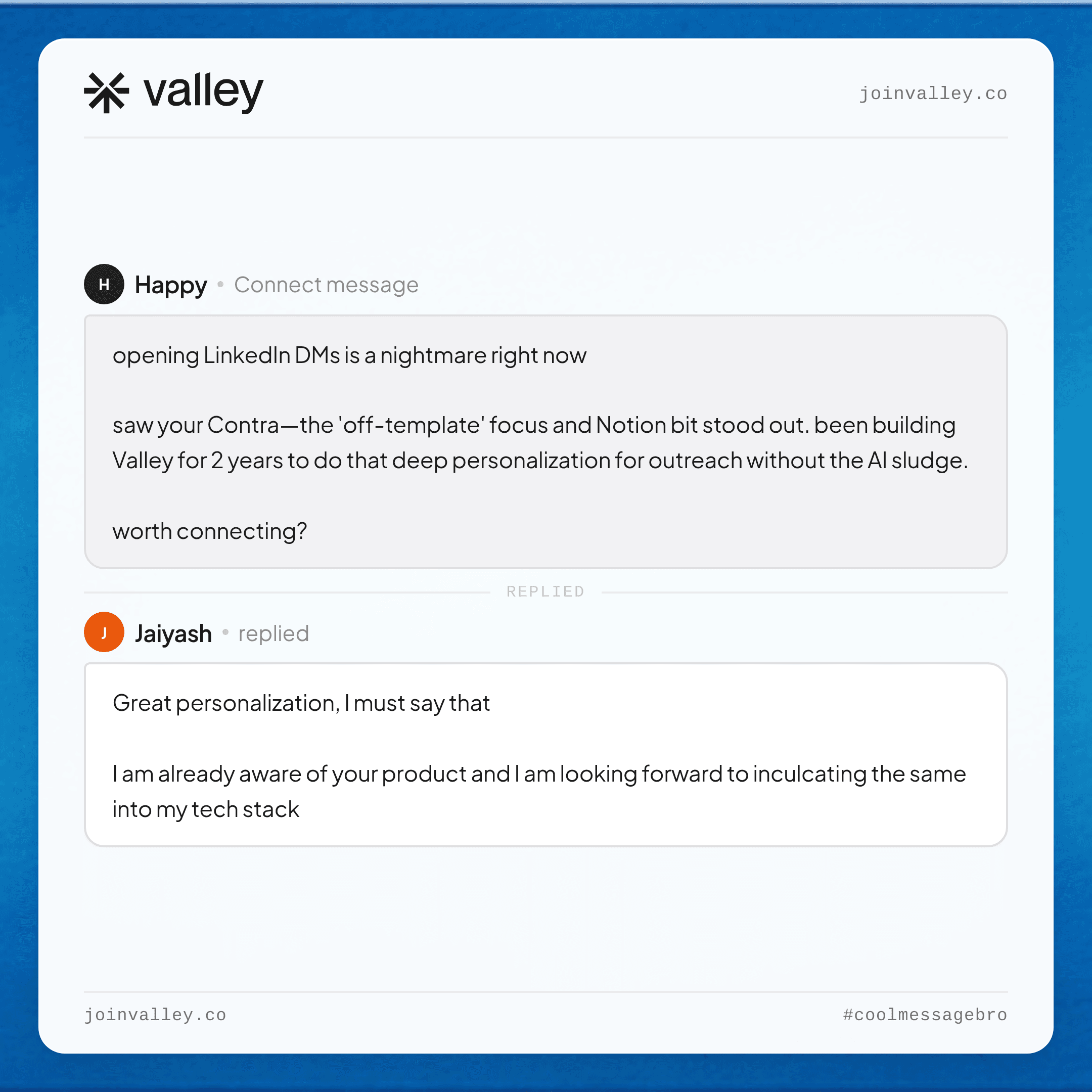
► Check Out More of Valley's Incredible Outreach: A compilation of real time messages and responses!
What Are Best Practices for Valley's Connection Request Messages?
Connection requests face strict character limits (300 on desktop, even shorter on mobile), making concise, compelling copy essential.
Lead With the Signal: Immediately reference why you're connecting:
"I noticed you viewed my profile this week" "I saw your comment on [topic] and wanted to connect" "Your team checked out our website - thought I'd reach out"
Signal references establish context and demonstrate you're not randomly connecting.
Avoid the Generic Introduction: Skip: "I'd like to add you to my professional network" Skip: "I see we share similar interests in [industry]" Skip: "I'm growing my network with sales professionals"
These generic phrases scream mass automation and get ignored.
Provide Immediate Relevance: Explain why connecting makes sense for them:
"I share insights about [topic relevant to their role] that might be useful" "I work with [companies like theirs] helping them [specific outcome]" "I thought you'd find our approach to [their challenge] interesting"
Focus on their potential benefit, not your desire to sell.
Use Mutual Connections: When available, reference shared connections:
"[Mutual connection] suggested I reach out" "I see we both know [Name] - they've found our [offering] valuable"
Mutual connections provide social proof and credibility.
Keep It Conversational: Write like a professional reaching out to a peer, not a salesperson pitching:
Better: "Saw you're focused on LinkedIn outbound at [Company]. I work in this space and thought we should connect." Worse: "I'd like to discuss how our innovative solutions can optimize your LinkedIn strategy going forward."
End With Soft CTA or No CTA: Connection requests shouldn't hard-sell:
Good: "Let me know if you'd be open to connecting." Good: "Looking forward to connecting." Avoid: "Book a meeting here: [link]" Avoid: "Can I send you more information about our platform?"
Save the pitch for messages after connection acceptance.
Valley's AI Application: Valley generates connection request messages following these principles automatically, adjusting for signal type (profile view vs. post engagement), prospect seniority (more formal for C-level, casual for peers), and campaign context (competitive displacement vs. warm introduction).
What Are Best Practices for Valley's InMail Messages?
InMails allow longer, more detailed messages - but length doesn't mean rambling. Effective InMails balance comprehensiveness with conciseness.
Subject Lines Matter: Unlike connection requests, InMails include subject lines that determine open rates:
Specific: "Your recent [activity] + our work in [their industry]" Curiosity-driven: "Interesting timing for [Company]'s LinkedIn outreach" Direct value: "3 ideas for [Company]'s [specific challenge]"
Avoid generic: "Quick question" or "Following up"
Open With Context: First sentence establishes why you're reaching out:
"I noticed [Company] visited our pricing page yesterday and thought I'd reach out directly" "I saw your LinkedIn post about [topic] - you raised a point we're helping similar companies address" "Given [Company]'s recent [trigger event], I thought you'd find our approach to [challenge] relevant"
Demonstrate Research: Show you've done homework beyond basic profile scraping:
Reference recent company news or announcements Mention specific posts they've published Acknowledge their company's growth trajectory or recent initiatives Note technology stack or competitor usage (when relevant)
This research differentiates your InMail from generic mass outreach.
Focus on Them, Not You: Structure message around prospect's interests and challenges, not your product features:
Worse: "Our platform has X features including Y and Z capabilities..." Better: "Companies in [their situation] typically struggle with [challenge]. We've found [specific approach] solves this by [outcome]."
Include Specific Value: Offer something beyond the meeting request:
Share a relevant insight or data point Mention a case study from similar companies Offer a resource (guide, framework, template) Provide a specific recommendation based on research
Value-first approaches dramatically improve response rates.
Clear, Low-Friction CTA: End with easy next step:
"Worth a 15-minute conversation? Here's my calendar: [link]" "If this resonates, I'd love to share how we approach this. Reply with a good time?" "Want to see the framework we built? I can send it over or walk you through it briefly."
One clear CTA performs better than multiple options.
Respect Length Limits: InMails allow 2000 characters, but shorter performs better:
Ideal length: 500-800 characters (100-150 words) Maximum length: 1200 characters (200 words) Avoid: Full 2000 character messages that look like essays
Valley's AI Application: Valley's 7-LLM architecture generates InMails that incorporate research from 25+ sources, reference specific signals and triggers, match your voice and tone preferences, and maintain optimal length while providing substance.
► See real Valley messages and the replies they earned, compiled in one place

Sales Navigator provides 50 InMail credits monthly. Valley maximizes the value of each credit through intelligent allocation and open profile detection.
Credit Refund Tracking: InMail credits are refunded when prospects respond within 90 days. Valley tracks which messages generate responses (earning refunds) versus those that don’t (permanent credit cost).
Over time, this data reveals which prospect types and message approaches yield highest refund rates, informing future credit allocation.
Open Profile Prioritization: Valley’s open profile detection provides massive credit savings:
Traditional approach: 50 InMails/month limited by credits Valley approach: 50 InMails to closed profiles + 800+ free InMails to open profiles
This 16x multiplication dramatically increases outreach capacity without additional cost.
Tiered Credit Allocation Strategy: Valley helps prioritize InMail credit usage:
Tier 1 (Best-fit + closed profiles): Use InMail credits Tier 2 (Okay-fit + closed profiles): Use connection requests first, InMails as backup Tier 3 (Best-fit + open profiles): Free InMails without credits Tier 4 (Okay-fit + open profiles): Free InMails without credits
This tiering ensures credits go to highest-value prospects.
Credit Pacing Throughout Month: Avoid using all 50 credits in the first week, leaving no capacity for hot prospects later. Valley paces credit usage:
Week 1: Use 12-15 credits (primarily best-fit prospects) Week 2: Use 12-15 credits Week 3: Use 12-15 credits Week 4: Use 8-10 credits (reserve for urgent opportunities)
This pacing maintains flexibility throughout the month.
Connection Request + InMail Sequences: For prospects reachable through connection requests, Valley can use staged approach:
Day 1: Send connection request Day 7: If no acceptance, send InMail referencing the pending request Day 14: If InMail generates response, credit is refunded
This sequence maximizes free methods while maintaining persistent outreach.
Performance-Based Reallocation: If certain prospect segments consistently generate responses (earning refunds) while others don’t, Valley can shift credit allocation:
More credits to high-response segments (net credit cost is lower due to refunds) Fewer credits to low-response segments (permanent credit loss isn’t worth it)
► Btw, here’s the Valley Warm Outbound Launch Video
When Should You Use Connection Requests vs. InMails in Valley?
Strategic method selection depends on prospect characteristics, campaign objectives, and resource constraints.
Use Connection Requests When:
Prospects are 2nd or 3rd degree connections (mutual connections exist) You’re building long-term network relationships, not just immediate sales You can accept the 25/day limit based on campaign volume Message content fits within 300 characters naturally You want to conserve InMail credits for higher-value scenarios Your messaging strategy emphasizes network building first, selling second
Use InMails When:
Prospects are beyond 3rd degree OR have no mutual connections You need to exceed 25 daily outreach capacity Message requires longer explanation (complex offerings, technical details) Prospects have open profiles (free InMails without credit cost) Speed-to-contact matters more than credit conservation You’re running time-sensitive campaigns tied to events or announcements
Hybrid Approach (Recommended for Most):
Use connection requests as primary method for accessible prospects Reserve InMail credits for best-fit prospects beyond connection request reach Exploit open profiles aggressively for credit-free InMail volume Test both methods with similar prospect segments to determine which performs better for your market
Valley’s automatic method selection implements these strategic considerations, defaulting to optimal approach for each prospect while respecting your preferences and constraints.
Most successful Valley users employ hybrid strategies that maximize free outreach methods while strategically deploying InMail credits where they drive highest returns.
► From reading to results: start your free 7-day Valley trial
FAQ
Which converts better, requests or InMail? Warm connection requests win when the prospect has shown a signal; InMail earns its credits on senior or hard-to-reach targets where waiting for an accept costs the moment.
Does Valley decide the channel automatically? It sequences both with condition branching - request, follow-up, InMail, email - and you keep approval over what goes out.
Do InMails hurt deliverability of anything? No, but wasted credits on cold targets hurt budgets - which is why signal-first targeting comes before channel choice.
