
Try Valley
Put your outbound workflow to work.

Saniya Sood
Published:
Updated:
Published November 15, 2025 · Updated August 31, 2026
TL;DR: LinkedIn caps connection requests at roughly 100 invitations per week for most accounts, on a rolling weekly reset. Hitting the wall repeatedly, or a pile of ignored pending invites, hurts future deliverability - withdraw old pending requests and spend the 100 on researched, personalized targets instead of volume. InMail, Open Profile messages and engaging before connecting all work outside the cap.
Why trust us on limits: Valley operates 1,000+ LinkedIn accounts with zero restrictions - working inside the caps is the whole design. The full picture across every limit type: LinkedIn limits in 2026, and the safe-architecture question in the safest automation tools.
LinkedIn is a powerful platform for prospecting lead generation and establishing professional connections. However, understanding the weekly invitation limit on LinkedIn is crucial for effective outreach. Currently, LinkedIn allows users to send a maximum of 100 invitations per week. This limit is applicable to all users, regardless of whether they have a premium account or use LinkedIn Sales Navigator.
What Is the Weekly Invitation Limit on LinkedIn & Unique Views Explained
The LinkedIn Limits That Could Kill Your Outbound Strategy
Every sales leader asks the same questions: What is the weekly invitation limit on LinkedIn? How do unique views on LinkedIn translate to pipeline? The answers determine whether your LinkedIn strategy thrives or gets your account restricted. Valley AI was built by founders who spent 6 years perfecting LinkedIn outreach - we know exactly how to maximize results within LinkedIn’s safety parameters.
Most automation tools will get you banned. Valley’s intelligent approach has protected thousands of accounts while generating 3-4x higher response rates than any Outreach alternatives.
► Book a demo (teams of 5+)and explore how Valley can support your use case
Understanding Invitation Limits
The invitation limits are designed to maintain the quality of connections on LinkedIn. Once you have sent out the maximum number of connection requests, you will encounter a notification stating, “you’ve reached the weekly invitation limit.” This means you cannot send any more connection requests until the limit resets the following week.
Strategies for Effective Outreach
While the weekly limit can be a hurdle, there are effective strategies to maximize your outreach:
Use LinkedIn Groups: Engage with members in LinkedIn groups to find targeted leads and enhance your visibility without sending direct connection requests.
Personalized Messages: When sending connection requests, include a personalized message to increase the chances of your invitations being accepted.
Follow Up: After connecting, follow up with valuable content or messages that can lead to meaningful conversations.
Some users may look for ways to bypass the LinkedIn weekly invitation limit. While it’s essential to adhere to LinkedIn’s guidelines, here are a few methods to optimize your connection strategy:
Resetting Limits: Each week, your limit refreshes, allowing you to send new connection requests. Plan your outreach accordingly.
Engaging with Existing Connections: Focus on nurturing relationships with connections rather than solely seeking new ones. This can lead to referrals and new opportunities.
Utilizing LinkedIn InMail: For those with a premium account, using LinkedIn InMail can be an effective way to reach out to potential leads without counting against your connection request limit.
For instance, if you are a sales professional targeting a specific industry, you might reach your connection requests per week limit quickly. In such cases, consider using LinkedIn’s features like Sales Navigator to identify unique views on LinkedIn profiles, which can help in crafting targeted outreach strategies without exceeding the weekly limit.
In 2025, it is expected that LinkedIn may reevaluate its invitation limits. Keeping abreast of any changes will be crucial for users heavily reliant on LinkedIn for lead generation.
Understanding the weekly invitation limit on LinkedIn is essential for maximizing your networking efforts. By strategizing your approach to send invitations, engaging with your existing connections, and utilizing LinkedIn’s tools effectively, you can enhance your professional network while adhering to the platform’s guidelines.
LinkedIn is a powerful platform for networking, outreach, and lead generation, particularly for professionals looking to connect with targeted leads. However, users often encounter a restriction known as the weekly invitation limit on LinkedIn, which can impact their ability to grow their network.

Officially, LinkedIn states what is the weekly invitation limit on LinkedIn varies by account. Our data across thousands of Valley users reveals the actual limits:
LinkedIn's Real Connection Limits:
New accounts (0-3 months): 20-30/week safely
Established accounts (3+ months): 70-100/week safely
Premium accounts: Same limits (Premium doesn't increase limits)
Weekly limit reset: Sunday midnight PST
Valley's Safety Protocol:
Automatically detects account age
Sets conservative daily limits (never exceeding 25/day)
Spreads invitations throughout the day
Monitors acceptance rates
Adjusts based on LinkedIn's signals
This is why Valley users never see restrictions while Waalaxy and Dripify users regularly report account issues.
The weekly invitation limit on LinkedIn is set to allow users to send a maximum of 100 invitations per week. This limit is put in place to prevent spam and ensure that users are making meaningful connections. Once you reach this threshold, you will receive a message stating, “you’ve reached the weekly invitation limit,” halting any further connection requests until the limit resets.
Understanding the connection request limit on LinkedIn is crucial for effective lead generation. For instance, if you are actively using LinkedIn for prospecting, reaching the limit can hinder your outreach efforts. Consequently, you might need to explore outreach alternatives such as engaging with LinkedIn groups or sending LinkedIn InMail messages to connect with potential leads.
Bypassing the Weekly Invitation Limit
While it's essential to adhere to LinkedIn's policies, users often seek ways to bypass the LinkedIn weekly invitation limit. Here are a few strategies:
Optimize Your LinkedIn Profile: Ensure your profile is attractive to potential connections, increasing the chances of acceptance without needing to send numerous requests.
Utilize LinkedIn Sales Navigator: This premium account offers advanced search features and allows for more targeted outreach, enhancing your chances of connecting with leads without hitting the limit.
Engage with Content: Instead of sending multiple connection requests, engage with posts and articles in your network. This can lead to organic connections.
Resetting Your Invitation Limit
The limit resets every week, allowing you another chance to send up to 100 invitations. Keeping track of your sent connection requests can help manage your outreach effectively. If you are utilizing a premium account, you may have additional features to assist in managing your connections.
Understanding the weekly invitation limit on LinkedIn is key for anyone looking to expand their network. By adhering to this limit and exploring creative outreach strategies, you can optimize your efforts in lead generation and build a robust network of connections that can contribute to your professional success.
LinkedIn, the premier professional networking platform, has established a weekly invitation limit to maintain the quality of connections and user experience. As of now, the weekly invitation limit on LinkedIn is set at 100 invitations per week. This limit applies to connection requests that users can send to potential connections, including targeted leads and outreach alternatives.
The weekly limit is crucial for effective lead generation and prospecting within your professional network. Once you send 100 invitations in a week, you will receive a notification stating, “you’ve reached the weekly invitation limit.” This mechanism is designed to prevent spam and ensure that LinkedIn users engage in meaningful connections.
While the weekly invitation limit is a standard practice, some users seek methods to bypass LinkedIn's weekly invitation limit. One common approach is to utilize a LinkedIn premium account or tools like LinkedIn Sales Navigator, which can enhance your outreach capabilities and may provide additional features for connecting with potential leads.
For instance, if you are a sales professional aiming to connect with industry leaders, you might send connection requests to individuals who have unique views on LinkedIn or who actively participate in LinkedIn groups. However, once you reach the weekly connection limit, you will need to wait until the limit resets the following week to send more invitations.
Managing Pending Invitations
To maximize your outreach, it's important to manage your pending invitations effectively. You can monitor the number of pending invitations in your LinkedIn profile and adjust your strategy accordingly. If you find that you've sent too many requests without responses, consider refining your approach to ensure that your connection requests are more targeted and relevant.
Looking ahead, it is anticipated that LinkedIn may adjust its invitation limits in 2025, potentially impacting the weekly invitation limit on LinkedIn. Staying informed about these changes can help you optimize your LinkedIn outreach strategies and maintain an effective lead generation process.
In summary, understanding the weekly invitation limit on LinkedIn is essential for effective networking and lead generation. By adhering to these limits and exploring options like LinkedIn Premium or Sales Navigator, you can enhance your outreach efforts and successfully connect with new leads while navigating the platform's constraints.
What Are Unique Views on LinkedIn: Your Hidden Pipeline Signal
Understanding what are unique views on LinkedIn unlocks a powerful prospecting opportunity. Unique views represent individual people viewing your profile (counted once per member, regardless of multiple views). Valley transforms these viewers into pipeline:
Traditional Approach: Check who viewed your profile manually Valley Approach: Automatically capture, research, and engage profile viewers
Our data shows profile viewers convert at 3x the rate of cold prospects because they've already shown interest in you or your company.
Targeted Leads: Working Within LinkedIn's Framework
Generating targeted leads on LinkedIn requires understanding both the platform's capabilities and restrictions:
LinkedIn's Invitation Priorities:
1st-degree connections: Unlimited messaging
Group members: Higher acceptance rates
Alumni networks: Increased trust
Event attendees: Contextual relevance
InMail recipients: Bypass connection requirements
Valley leverages all five channels intelligently, maximizing your reach while maintaining account safety.
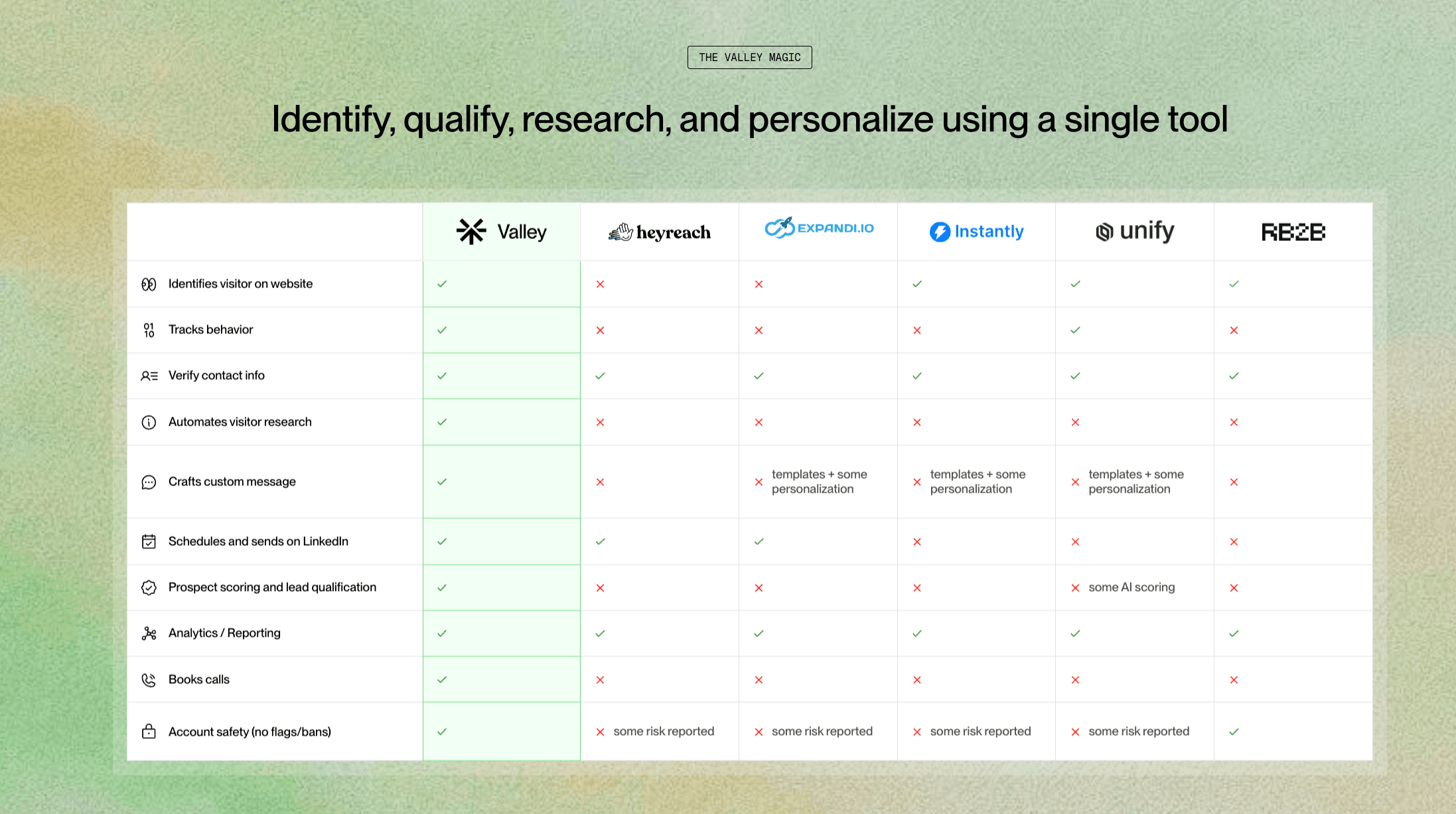
Prospecting Lead Generation: The Valley Safety Advantage
Traditional prospecting lead generation on LinkedIn is risky. Most Outreach alternatives either:
Ignore LinkedIn's limits (account risk)
Stay too conservative (limited results)
Use unsafe methods (browser extensions)
Valley's approach protects while performing:
Safety Feature | ||||
|---|---|---|---|---|
Cloud-based (no extension) | ✓ | ✓ | Partial | ✓ |
Dedicated IPs | ✓ | ✗ | ✗ | ✓ |
Smart limits | ✓ | Basic | Basic | Basic |
Open/closed profile detection | ✓ | ✗ | ✗ | ✗ |
Auto-warming | ✓ | ✗ | ✗ | Partial |
Account age detection | ✓ | ✗ | ✗ | ✗ |
When Does LinkedIn Weekly Limit Reset: Optimizing Your Outreach Cadence
Knowing exactly when does LinkedIn weekly limit reset lets you optimize campaign timing:
Reset Schedule:
Connection requests: Sunday midnight PST
InMails: Monthly, based on subscription date
Profile views: No limit, but patterns matter
Messages: No hard limit, but velocity matters
Valley's Optimization Strategy:
Front-load campaigns Monday-Tuesday (highest acceptance)
Reduce volume Friday-Saturday (lower engagement)
Reserve InMails for high-value prospects
Maintain consistent daily patterns
Outreach Alternatives: Why Valley Dominates LinkedIn
When evaluating Outreach alternatives, most teams focus on features. But for LinkedIn, safety and intelligence matter more:
Outreach.io: Email-focused, no LinkedIn automation
SalesLoft: Similar to Outreach, enterprise email
Apollo: Basic sequences, poor LinkedIn integration
Dripify: Risky automation, no intelligence
Valley AI: Safe, intelligent, LinkedIn-native
Valley isn't just another alternative - it's purpose-built for LinkedIn excellence.
How to Check LinkedIn SSI Score: Your Performance Indicator
Understanding how to check LinkedIn SSI score helps optimize your LinkedIn presence:
Checking Your SSI:
Visit linkedin.com/sales/ssi
Review your four component scores
Compare to industry averages
Track weekly improvements
Valley's SSI Impact:
Establishes professional brand through consistent activity
Finds right people via intelligent targeting
Engages with insights through personalized messaging
Builds relationships through systematic follow-up
Unique Views on LinkedIn: Converting Visitors to Meetings
Profile viewers represent warm prospects. Here's how Valley capitalizes on unique views on LinkedIn:
Automatic Visitor Engagement:
Daily profile visitor export
AI researches each viewer
Crafts personalized message referencing their interest
Sends connection request or InMail
Manages follow-up sequence
Results: 35% acceptance rate, 15% meeting rate from profile viewers
Building Your LinkedIn Outreach Strategy Within Limits
Success requires balancing volume with safety:
Week 1-2: Foundation
10-15 connections daily
Focus on highest relevance
Monitor acceptance rates
Build posting rhythm
Week 3-4: Scaling
15-20 connections daily
Add InMail campaigns
Engage with content
Track SSI improvements
Month 2+: Optimization
20-25 connections daily (maximum)
A/B test messages
Leverage profile viewers
Maintain consistent pipeline

Protect your account while maximizing results:
Daily Limits (Valley Enforces):
✓ Connections: 25 maximum
✓ Messages: 50 maximum
✓ InMails: 10 maximum
✓ Profile views: 150 maximum
Behavioral Patterns (Valley Manages):
✓ Random delays between actions
✓ Human-like activity hours
✓ Varied message templates
✓ Natural engagement patterns
Valley Avoids:
✗ Sudden volume spikes
✗ Identical messages
✗ After-hours automation
✗ Suspicious patterns
Valley: The Safest Path to LinkedIn Success
While others gamble with your LinkedIn account, Valley protects it. Our platform combines 6 years of LinkedIn expertise with AI intelligence to deliver maximum results within safe parameters.
Valley’s safety features include:
Automatic limit management
Cloud-based execution (no extensions)
Dedicated IP addresses
Smart warming protocols
Open/closed profile detection
Real-time safety monitoring
Stop risking account restrictions with unsafe tools. Valley delivers 3-4x better results while keeping your LinkedIn account completely safe.
Zero restrictions, guaranteed.
► The safest test is a free one: 7 days of Valley, no restrictions
FAQ
What is the LinkedIn weekly invitation limit? About 100 connection requests per week for most accounts, applied on a rolling basis; some accounts see less if acceptance rates are poor.
When does the limit reset? Rolling weekly - roughly seven days after each batch was sent, not on a fixed Monday.
How do I reach more people without more invites? InMail (with Premium/Sales Navigator), messaging Open Profile members free, commenting and engaging before connecting, and making your outreach warm enough that acceptance - not volume - carries the number.
Do withdrawn invitations give the quota back? Withdrawing very old pending invites is good hygiene for your sender reputation, but the weekly cap is about sends - plan the 100 carefully rather than counting on refunds.
