Try Valley
Put your outbound workflow to work.

Saniya
Published:
Updated:
Published [original date] · Updated July 24, 2026
LinkedIn InMail lets paid subscribers message people outside their network. In 2026 the monthly credit allowances are: Premium Career 5, Premium Business 15, Sales Navigator Core 50, Recruiter Lite 30 - and every InMail that gets any response within 90 days is credited back. Unused credits roll over, capped at 3× your monthly allowance. Messages to Open Profile members are free and use no credits at all.

InMail is LinkedIn's paid direct-message channel to 2nd- and 3rd-degree connections - people who haven't accepted a connection request from you.
Free InMails (Open Profile messages). Any Premium/Sales Nav/Recruiter subscriber can message members who've enabled Open Profile - at no credit cost. This is the most under-used free channel on LinkedIn. (How Open Profiles work.)
Paid InMails. Credit-based messages to anyone (who hasn't opted out), included with paid plans.
Sponsored InMails (Message Ads). Sent through LinkedIn's ad platform to targeted audiences, labeled "Sponsored." Different tool, different budget - advertising, not outreach.
The credit system - the exact numbers (verified against LinkedIn's docs, July 2026)
Plan | InMail credits/month | Rollover cap |
|---|---|---|
Premium Career | 5 | 15 |
Premium Business | 15 | 45 |
Sales Navigator Core | 50 | 150 |
Recruiter Lite | 30 | 120 |
Three rules that change the economics:
The 90-day refund rule. In LinkedIn's own words: "Every InMail message that is accepted/declined or responded to directly within 90 days of it being sent is credited back." Even a decline refunds the credit. Only ignored InMails cost you.
Rollover. Unused credits accumulate up to 3× your monthly allowance (the caps above), then stop.
The practical consequence: a well-targeted InMail program is nearly self-funding - high response rates recycle credits. A badly-targeted one burns the full allowance on silence. The credit system is literally designed to reward relevance.
InMail limits and formats
Subject line: up to 200 characters. Body: up to 2,000 characters (about 300 words).
InMails are separate from your 1st-degree message and weekly invitation limits - see LinkedIn limits in 2026 for those.
Recipients can opt out of receiving InMail entirely; you can't message those members regardless of credits.
Best practices that actually move response rates
Lead with why them, why now. The first sentence must reference something real - their post, their role change, their company's news. Template InMails read as ads and get ignored (which also burns the credit).
Keep it under 100 words. You have 2,000 characters; the best-performing InMails use a fraction of them. One idea, one question.
Subject lines like a colleague, not a campaign. Lowercase, specific, short beats "Revolutionize Your Q3 Pipeline."
Send to warm signals first. Someone who viewed your profile or engaged with your content responds at a multiple of a cold recipient - and a response refunds the credit.
One follow-up, spaced a week. More than that inside InMail is diminishing and reads desperate; move the thread or move on.
Check Open Profile before spending a credit. If the prospect has Open Profile enabled, the same message costs nothing.
When InMail is not worth it (the honest section)
If they'd accept a connection request anyway. A personalized connection request costs nothing, and an accepted connection is a durable relationship, not a one-shot message. InMail's edge is speed to inbox, not conversion.
If your list is cold and untargeted. InMail doesn't fix relevance. A cold blast via InMail performs like a cold blast anywhere - except here, the silence also consumes your credit balance.
If you're doing volume outreach. 50 credits/month is not a channel - it's a scalpel. Teams that try to run pipeline on InMail alone hit the ceiling in week one.
The pattern behind all three: InMail is a premium delivery mechanism, and delivery was never the constraint. Who you message and what you say is. That's true of every LinkedIn channel.
The InMail decision tree (spend the credit or not?)
Since credits are the scarce resource, run every candidate through four gates:
Is their profile Open? → Message free, save the credit. Always check first; it's the most skipped step in InMail economics.
Would they accept a connection request anyway? → Send the request instead. An accepted connection is a durable relationship; InMail is a one-shot. Warm prospects (they viewed you, engaged you) accept at high rates - spending credits on them is paying for what's free.
Is this time-sensitive and high-value? → InMail earns its slot: the deal-window prospect, the senior buyer who ignored a request, the candidate-grade opportunity. The 90-day response refund means well-aimed InMails mostly recycle.
Is this just volume outreach wearing a premium stamp? → Don't. A cold template via InMail performs like a cold template anywhere, and unlike email, silence permanently burns the credit.
The pattern behind the tree: InMail is a bridge instrument - for prospects worth reaching now who haven't accepted the cheaper paths - not a channel to run pipeline on.
InMail in the multi-channel cadence (the 2026 placement)
The email era repositioned InMail inside the sequence rather than retiring it. The standard branched cadence - connection request → LinkedIn follow-up → InMail if unconnected and worth a credit → email - uses each instrument where it's strongest: the request builds the durable link, InMail jumps the queue for the prospects who ignored it, and email carries the substantive ask to the inbox where busy buyers actually process work. Two placement rules from the send data: never open with InMail on a prospect who's shown warmth (the request converts those for free), and never let InMail be the last touch - its one-shot nature means the sequence should always have the email rail behind it. (The full cadence logic.)
► Check out Valley's incredible outreach: a compilation of real messages and real responses
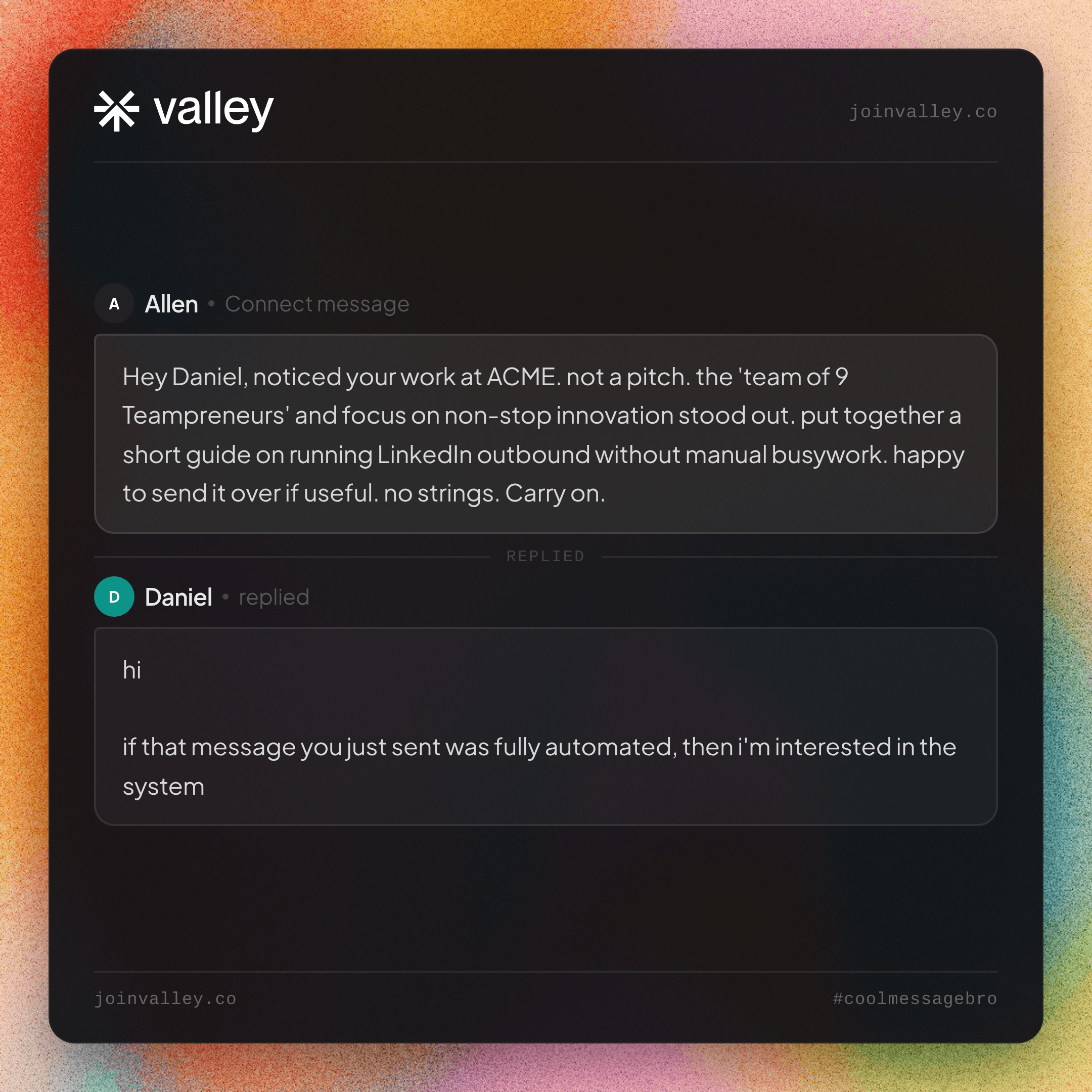

No templates here - templates are the problem - but the anatomy that works: subject lines read like a colleague’s (“your AE ramp question” beats “Revolutionize Your Pipeline” every audited time); first sentence names the real reason it’s them - their post, their hire, their signal - because InMail recipients decide in one line whether this is another blast; the body earns its length only if every sentence is about them (under 100 words remains the working rule); the ask is small - a reaction, an opinion, a yes/no - not a 30-minute calendar demand from a stranger. And the meta-rule that generates all four: if the message could be sent to anyone else unchanged, it isn’t ready to cost a credit.
Where InMail fits in a modern outbound system
The teams getting the most from InMail in 2026 don’t treat it as the channel - they treat it as one send mechanism inside a targeting system. That’s how Valley uses it: warm signals (profile viewers, post engagers, website visitors) get scored against your ICP, each qualified prospect gets researched, and the message goes out through the native mechanism that fits - connection request, free Open Profile message, or InMail - inside LinkedIn’s limits, from cloud infrastructure with a dedicated IP. The targeting is why Valley messages get 15 - 45% replies against a ~2% cold benchmark - and at those response rates, the 90-day refund rule means InMail credits mostly recycle themselves. Valley is $149/mo (billed quarterly) with a 7-day free trial, and has zero account restrictions across 1,000+ accounts, backed by a 5× safety guarantee.
The credit economics, worked out (a month on Sales Navigator)
Fifty credits, two operators, same month. Operator A (the blaster): 50 template InMails to a cold list. At cold-template response rates (~5 - 10% counting declines), maybe 4 credits refund; 46 are gone, the calendar gained one meeting, and next month starts from ~4 banked credits. Operator B (the targeter): checks Open Profiles first (12 of the 50 targets are messageable free - credits saved), sends connection requests to the 20 warm-signal prospects (free, high accept rates), and spends InMails only on the 18 senior, time-sensitive, non-Open, request-ignoring prospects - researched messages, every one. At the response rates researched InMail to selected prospects actually earns (any response refunds, including declines), 10 - 12 credits come back. Result: the same 50-credit allowance covered 50 prospects, produced multiple conversations, and ends the month with most of the bank intact - plus rollover room (150-credit cap on Sales Navigator) for a surge month. The 90-day refund rule makes InMail nearly self-funding exactly in proportion to how well you target - which is LinkedIn, structurally, paying you to do outreach properly.
Recruiters vs sellers: the same tool, different physics
Worth separating, because most InMail advice silently assumes one or the other. For recruiters, InMail is the primary instrument - candidates aren’t in your network by definition, response norms are higher (people like being recruited more than being sold), and Recruiter-product credit structures assume this volume. Craft still wins, but the channel fit is native. For sellers, InMail is the exception instrument - buyers are reachable through warmth (requests, content, signals) at better economics, and a sales InMail carries a higher skepticism tax than a recruiting one: the recipient knows it cost you something and wonders why the cheaper paths didn’t work. Sellers should route through the decision tree above; recruiters can lean on InMail directly and spend their optimization budget on message quality instead.
The bottom line
InMail’s 2026 role is smaller and sharper than its reputation: a credit-scarce precision instrument whose refund rule literally pays you to target well, bridging the prospects who ignored the free paths - not a channel to run pipeline on. Check Open Profiles first, spend credits behind the decision tree, keep messages under 100 words of them, and place InMail inside a branched two-channel cadence rather than at the front of a blast. Do that and the credits mostly recycle; skip it and no allowance is ever enough.
Related: LinkedIn limits in 2026 - the real numbers · Open Profiles explained · Email or LinkedIn first? The cadence · Valley pricing
FAQ
How many InMail credits do I get per month in 2026? Premium Career: 5. Premium Business: 15. Sales Navigator Core: 50. Recruiter Lite: 30. Verified against LinkedIn’s help documentation, July 2026.
Do unused InMail credits roll over? Yes - up to 3× your monthly allowance: 15 for Premium Career, 45 for Premium Business, 150 for Sales Navigator, 120 for Recruiter Lite. Beyond the cap they stop accumulating.
Do I get InMail credits back when someone replies? Yes. Any InMail that is accepted, declined, or responded to within 90 days is credited back - including Quick Replies. Only ignored InMails permanently consume a credit.
Can I send InMail for free? Yes, to members with Open Profile enabled - those messages cost no credits (you still need any paid LinkedIn plan to send them). Checking for Open Profile before spending a credit is the easiest InMail economy there is.
How long can a LinkedIn InMail be? 200 characters for the subject line, 2,000 characters for the body. The best-performing InMails use well under 100 words.
Is InMail better than a connection request? Different jobs. InMail lands in the inbox immediately without waiting for an accept - better for time-sensitive, high-value outreach. A connection request builds a lasting 1st-degree relationship and costs nothing. For most pipeline motions, connection requests to warm, qualified prospects outperform InMail blasts.
What response rate should I expect from InMail? It depends almost entirely on targeting. Cold, template InMails perform like cold outreach anywhere. Warm, researched messages to people already engaging with you respond at multiples of that - in Valley’s send data, warm signal-based outreach earns 15 - 45% replies.
Can I buy more InMail credits? LinkedIn ties credits to plan tiers rather than selling them à la carte on most plans; upgrading tiers (or Recruiter products) is the route to more. Before paying for more credits, check how many of your current InMails go to Open Profile members for free.
Should I use InMail or email for a prospect I’m not connected to? If you have a verified work email and they’re an inbox-processing persona: email - it’s free, threaded, and where busy buyers handle asks. If they’re feed-active, senior, and time-sensitive: InMail jumps the queue. In a branched sequence you rarely choose in the abstract - InMail bridges the ignored connection request, email carries the substantive follow-through. (The full cadence.)
Do InMail messages expire? The message persists in the recipient’s inbox, but the credit outcome resolves in the 90-day window: any response (including decline) refunds it; silence past 90 days consumes it permanently. Practical consequence: front-load your best targeting early in each credit month rather than banking sends for a batch blast.
Can automation tools send InMail for me? Tools operating natively within LinkedIn’s systems can sequence InMail steps (Valley includes InMail in its branched sequences, inside plan credit limits); anything promising unlimited InMail or credit workarounds is describing behavior LinkedIn’s terms - and detection - exist to stop. Same architecture rules as everything else: cloud, dedicated IP, human-pattern pacing.
