
Try Valley
Put your outbound workflow to work.

Saniya Sood
Published:
Updated:
Published January 15, 2026 · Updated August 31, 2026
Layer | What it does |
|---|---|
Multi-model core | 7 specialized LLMs across 25 processing steps per message |
Research | 200+ sources per prospect before a word is drafted |
Voice | learns your writing style so messages read as you |
Learning loop | a 500K+ real-message corpus and your own reply outcomes inform what works |
Control | you review and approve; automation never outruns you |
This page answers the top questions we get; the deeper dives: how the personalization works, how it clones your writing style, and what an AI SDR is (and why we reject the label). Plans in plain numbers: Valley pricing.
Valley employs a sophisticated multi-model architecture that goes beyond single LLM solutions. The platform uses 7 different specialized LLMs working in concert across 25 processing steps for each message. This isn’t just ChatGPT with a LinkedIn wrapper - it’s purpose-built AI for B2B outreach.
Each model handles a specific function: one analyzes your company context, another researches prospects, a third handles personalization, a fourth ensures message quality, a fifth manages tone matching, a sixth handles qualification scoring, and a seventh optimizes for LinkedIn’s specific constraints. This orchestrated approach produces messages that feel genuinely human while incorporating deep research insights.
Is Valley Using RAG (Retrieval-Augmented Generation) Technology?
Yes, Valley implements RAG architecture but with enhanced capabilities. The system pulls from your company knowledge base while maintaining dynamic context switching based on prospect signals. Each of the 7 LLMs handles specific tasks - research, qualification, personalization - rather than operating as one generalist model.
The RAG implementation means Valley doesn’t just memorize templates or scripts. Instead, it dynamically retrieves relevant information from your product configurations, writing styles, and prospect research to construct each message. This architecture ensures consistency with your brand voice while allowing infinite variation in actual message content.
How Does Valley Research and Personalize Each Message?
Valley‘s research engine captures 60-100 data points per prospect from multiple sources:
LinkedIn profiles, posts, and activity patterns
Complete company websites (every page indexed)
Social media presence (TikTok, Instagram, YouTube, Substack, Spotify)
Fundraising history and investor information
Press releases and news mentions
Hiring trends and open positions
Podcast appearances and speaking engagements
Published content and thought leadership
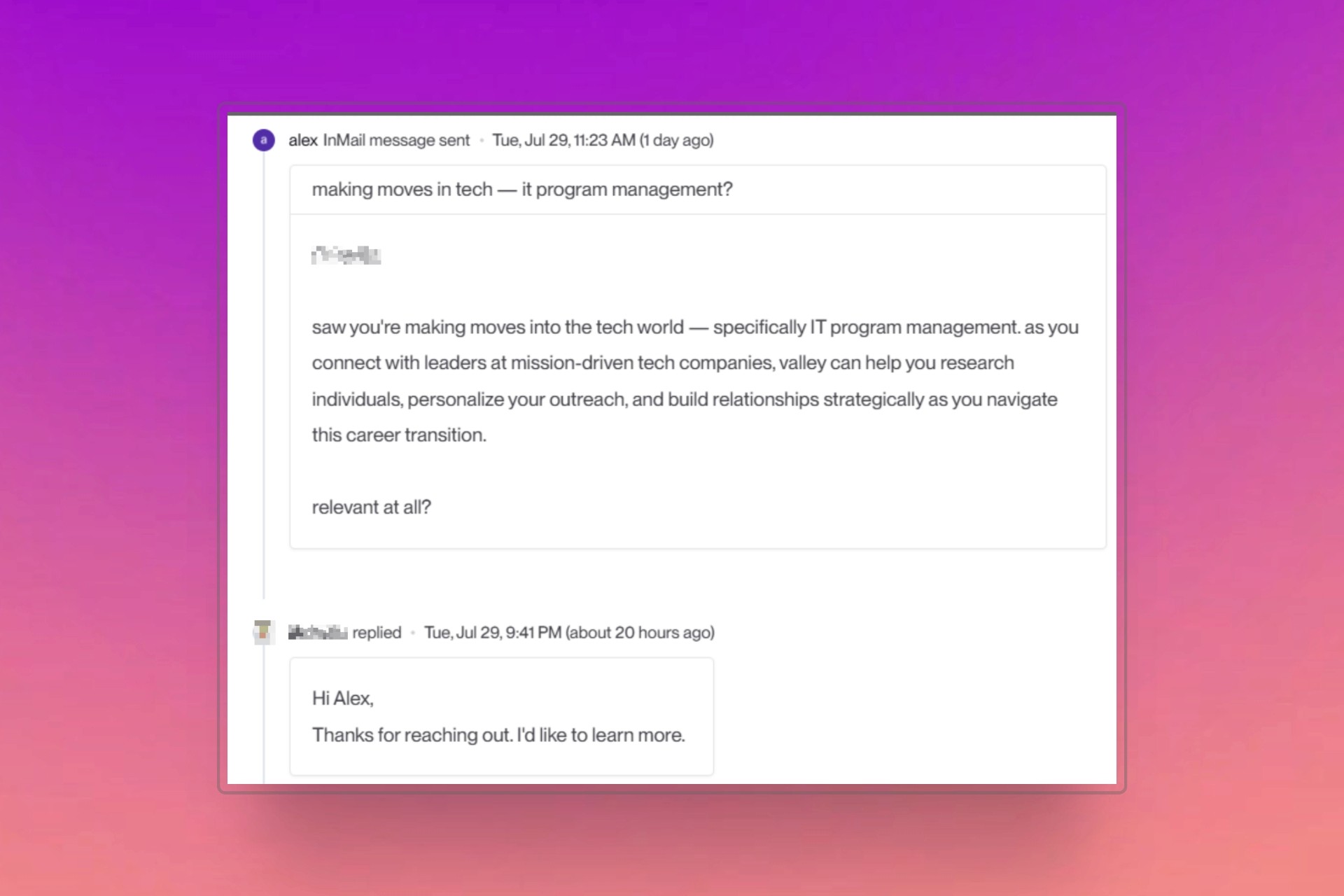
The AI then determines which research details are most relevant for each specific prospect. For instance, if targeting a CMO who recently spoke about attribution challenges at a conference, Valley might reference that specific quote while positioning your solution in that context. This creates genuinely personalized messages rather than template variations with merge fields.
If your team builds its own AI agents around a workflow like this, platforms such as Lyzr, an enterprise AI agent platform with a no-code builder and a control plane for testing, monitoring and governing agents in production, are where that work usually lives.

Give your sales team
an unfair advantage.
Absolutely. Valley offers multiple customization layers that give you precise control over messaging:
Writing Style Configuration: Define exactly how Valley should communicate - tone, structure, specific phrases to use or avoid. You can upload existing emails or content samples, and Valley will extract your communication patterns.
Research Prioritization: Instruct Valley to look for specific signals hierarchically. For example: "Find the most recent funding round. If unavailable, check for sales hiring. If neither exists, reference recent news. If no recent news, mention their latest LinkedIn post." This creates a waterfall approach ensuring relevant personalization for every prospect.
Product-Specific Context: Create unlimited products with unique ICPs, value propositions, pain points, proof points, and competitive positioning. Valley adapts messaging based on which product matches each prospect, allowing you to run completely different campaigns from the same account.
Campaign-Level Instructions: Add specific angles, offers, or calls-to-action for individual campaigns while maintaining your overall voice and approach.
Does Valley Learn and Improve Over Time?
Valley learns marginally from individual feedback but improves significantly through systematic updates. When you notice patterns needing adjustment, update your Writing Style configuration and use the Training Center to propagate changes across all campaigns. This ensures consistent improvement rather than random learning.
The platform captures feedback at multiple levels: individual message edits teach Valley about specific preferences, campaign-level feedback adjusts broader patterns, and writing style updates create systematic improvements. Most users see significant improvement in message quality within the first 30 days as Valley absorbs these various inputs.
How Does Valley Compare to Tools Like Twain?
While Twain focuses on email optimization through copy suggestions, Valley provides direct LinkedIn integration with superior message quality. As one customer noted, Valley offers "a similar experience to using Twain for email" but specifically optimized for LinkedIn's unique context and constraints.
Valley handles the entire workflow - research, personalization, sending, follow-up management - not just copy optimization. Where Twain might suggest improvements to your draft, Valley creates the entire message from scratch based on deep prospect research and your established patterns.

Give your sales team
an unfair advantage.
Traditional tools like HeyReach & Expandi provide blank text fields and merge variables, requiring you to create templates and hope they resonate. Valley fundamentally differs by eliminating templates entirely:
No templates: Every message is uniquely generated based on prospect research
Deep contextualization: 60-100 data points inform each message’s angle and content
Intelligent qualification: Prospects scored before outreach ensures you only message high-fit leads
Multi-model processing: 7 LLMs ensure message quality, relevance, and authenticity
The result: Messages that look like you spent 15 minutes researching and writing personally, incorporating subtle nuances of how you communicate while weaving in relevant, timely research that actually matters to each prospect.

Book a demo (teams of 5+)today to see Valley’s AI personalization in action against template-based alternatives.
Try Valley to begin generating higher-quality LinkedIn conversations today.
FAQ
Is Valley just a ChatGPT wrapper? No - it is a purpose-built pipeline: 7 specialized models handling research, qualification, drafting and voice across 25 steps per message, which is why the drafts survive contact with real prospects.
Where does the research come from? 200+ public sources per prospect - profile, posts, company signals, news - synthesized before drafting, so personalization references something real.
Does Valley improve over time? Yes - your edits, your reply outcomes, and a 500K+ real-message training corpus shape what gets drafted next.
Do I stay in control? Always - messages wait for your approval until you deliberately loosen the reins, and everything sends from your own accounts in your own voice.
See also: How Does Valley's AI Personalization Work? · How Does Valley's AI Personalization Work for LinkedIn Outreach? · How Does Valley's AI Message Personalization System Work?


