How to Personalize LinkedIn Messages at Scale Using AI

Try Valley
Make LinkedIn your Greatest Revenue Channel ↓

Saniya
Published:
Updated:
How to Personalize LinkedIn Messages at Scale Using AI
Published June 19, 2026 · Updated August 31, 2026
Most LinkedIn outreach fails the moment it lands. Recipients can smell a template from the first line, and generic automation gets ignored at roughly the same rate as cold email, which, according to a June 2026 Expandi report, now averages just 3.43% reply rates across billions of sends. LinkedIn direct messages, by contrast, average 10% even on cold outreach, with warm and well-personalized campaigns reaching 18 - 45%.


The gap between those numbers comes down to one thing: relevance. And AI has fundamentally changed how much relevance is achievable at scale.

Why token-merge personalization stopped working
For years, "personalization at scale" meant swapping in a first name and a job title. Prospects got so used to it that the formula now signals spam rather than effort. A message opening with "Hi [First Name], I noticed you're the VP of Sales at [Company]..." telegraphs automation before the second line lands.
Real personalization requires context: knowing what someone posted last week, what their company just announced, which problems their industry is wrestling with, and why they'd care about your solution right now. That research is what makes a message feel written by a human who actually looked, not a tool that pulled a CSV.
The challenge is time. Doing this manually for 50 prospects takes a full workday. Doing it for 500 is impossible without a team.
AI closes that gap.
Step 1: Start with intent signals, not a cold list
The biggest lever in LinkedIn personalization isn't the message itself, it's who you're messaging. Sending personalized outreach to someone who has never heard of you still requires cold context. Sending it to someone who just viewed your profile, engaged with your post, or followed your company page gives you a natural, specific reason to reach out.
These intent signals transform the opening line from invented to earned. Instead of fabricating relevance, you're responding to it.
This is the principle behind signal-based outbound vs cold email: warm leads already inside your orbit reply at dramatically higher rates because the outreach lands in context, not out of nowhere. Valley captures five of these signal types automatically, profile viewers, post engagers, company page followers, competitor engagers, and website visitors, and routes them into outreach workflows before the intent fades.
Step 2: Filter to ICP before a single message goes out
Scale without qualification produces noise. If your AI is personalizing messages for everyone who viewed your profile, including students, competitors, and recruiters, you're burning your daily LinkedIn message capacity on contacts that will never convert.
AI-driven ICP scoring and lead qualification solves this. By evaluating each captured lead against firmographic criteria, company size, industry, seniority, role, before any message is drafted, you focus your outreach exclusively on the top 20% most likely to become customers. Non-fits get removed automatically.
This isn't just efficiency. It protects your account standing, because LinkedIn's algorithm is more likely to flag high-volume outreach with low acceptance and reply rates. Targeted, relevant outreach keeps those metrics healthy.
Step 3: Use deep research to build real context
Once you've identified high-fit leads showing intent, the AI research layer runs before a single word of the message is written. This is where the quality gap between generic personalization tools and genuine AI research shows up most clearly.
Surface-level tools pull a job title and company name. Deeper research means analyzing a prospect's recent LinkedIn posts, their company's funding announcements, industry news, podcast appearances, blog content, and the specific problems their business is facing. Valley, for instance, analyzes 60+ data points per prospect, blogs, newsletters, videos, company news, to find the specific "why" that makes a message contextually relevant.
The result is an opening line that couldn't have been sent to anyone else. That specificity is what drives AI personalization that sounds human rather than processed.
Step 4: Clone your writing voice
Even a perfectly researched message falls flat if it sounds like a different person wrote it. Prospects interacting with your brand, through content, a referral, or a profile view, have formed an expectation of how you communicate. A stilted, formal AI-generated message breaks that expectation immediately.
The solution is writing-style cloning. By training an AI on your existing posts, your tone, your sentence patterns, and your vocabulary choices, the drafted messages sound like you wrote them. Not a generic sales rep, not a content team, you.
This matters especially for founder-led sales motions, where the personal brand is the primary trust signal. Valley's AI voice cloning for LinkedIn outreach works by analyzing past writing samples to replicate style at the message level, including how the same stylistic personality carries through from the initial outreach into reply handling.
Step 5: Execute within LinkedIn's safety limits
This is where many teams get into trouble. High-volume automation tools that ignore LinkedIn's sending behavior thresholds result in account restrictions and, eventually, suspension. All the personalization in the world doesn't matter if your account gets banned.
AI-powered outreach tools built specifically for LinkedIn (rather than generic multi-channel automation) operate within the platform's safety rails, pacing connection requests, spacing InMails, and avoiding the volume spikes that trigger detection. Valley has maintained zero LinkedIn account suspensions across years of operation, a direct result of designing for account safety rather than raw throughput.
For teams running AI LinkedIn outreach at scale safely, the rule is straightforward: native execution that mirrors human behavior protects the account; bot-like volume patterns destroy it.
Step 6: Approve or autopilot, then manage replies
Scaled personalization still benefits from a human checkpoint, at least initially. Reviewing drafted messages for the first few weeks lets you calibrate the AI's voice match, catch any research errors, and verify that the tone is right for your audience. Once quality is consistent, autopilot mode handles sending without manual intervention.
Reply management closes the loop. When a prospect responds, the same contextual research that informed the original message should inform the follow-up. AI tools increasingly handle this by surfacing the prospect's context alongside the reply, so the conversation continues in the same voice rather than dropping back to a generic template.
Valley users report that prospects frequently compliment the quality of the outreach directly in their replies, the clearest signal that the personalization landed as intended.
► Real messages Valley sent, real replies they got: see the compilation
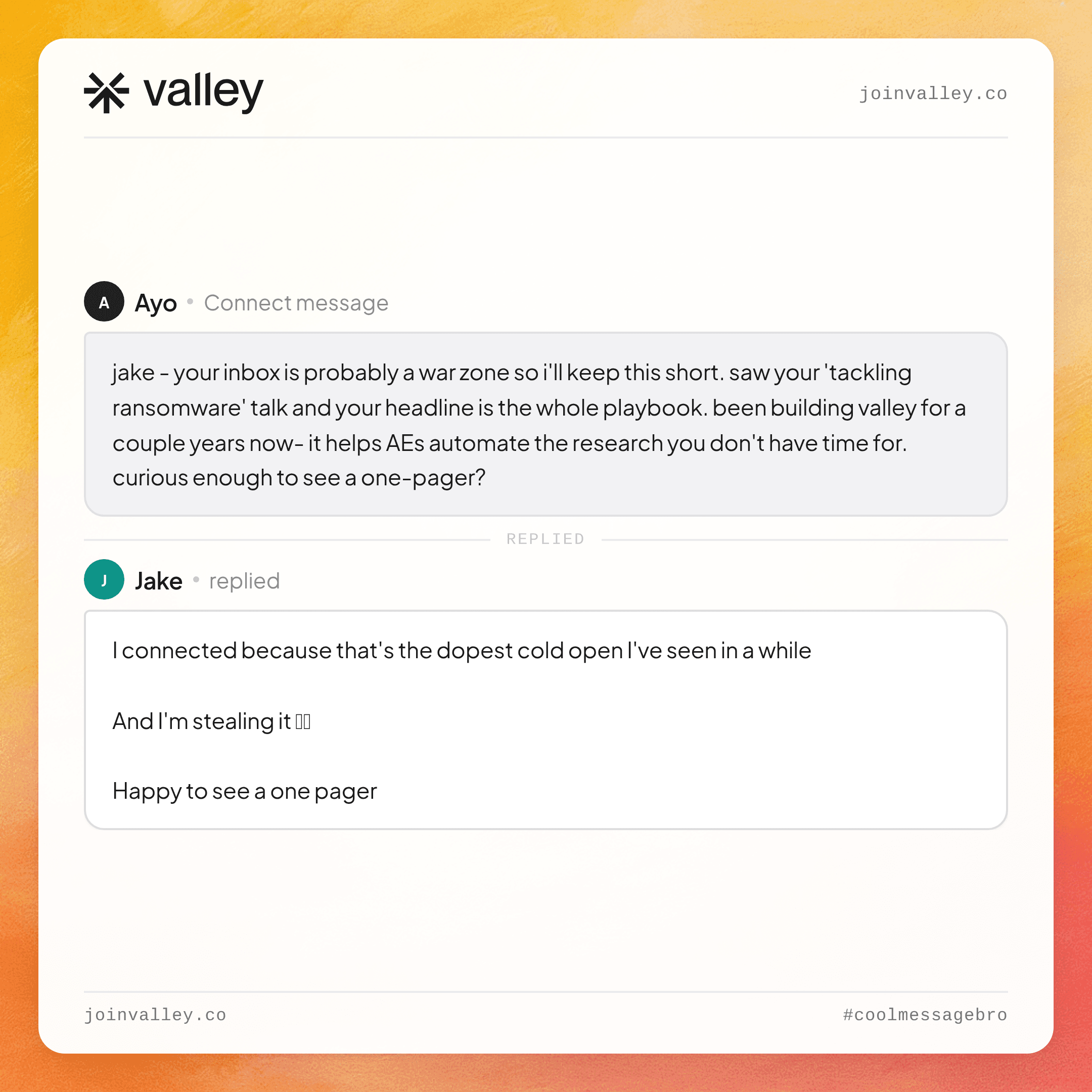

What the results actually look like
The numbers are worth grounding in specifics. A July 2025 Belkins study found that personalized LinkedIn connection requests achieve a 9.36% reply rate versus 5.44% for no-message requests. According to Valley's own customer data, warm signal-based outreach produces 15 - 45% reply rates, versus the 1 - 3% cold email benchmark. Bolt.new booked 20 enterprise demos in 40 days using this approach; ThinkFish books 400+ meetings monthly.
The Belkins data and Valley's results aren't contradicting each other, they're measuring different populations. Fully cold, lightly personalized outreach lands at the lower end. Warm signal-based outreach with deep research and voice-matched messaging lands at the higher end. The methodology determines the outcome.
Building the system vs. stitching tools together
The DIY path, scraping with PhantomBuster, enriching through Clay, wiring Zapier, writing with a separate AI layer, sending through another tool, can approximate this workflow. It also requires a GTM engineer to maintain, costs significantly more in aggregate, and introduces brittle failure points at every integration.
Platforms like Valley consolidate the entire workflow: signal capture, ICP scoring, deep research, voice-matched message generation, and native LinkedIn sending in a single system. For teams who want the output without the infrastructure management, that's the practical alternative to building it yourself.
► Book a demo (teams of 5+)
For a detailed breakdown of how the research and personalization layers connect, see how AI combines research and personalization in outreach.
The core shift is simple: stop treating personalization as a text substitution problem and start treating it as a research problem. AI handles the research. You get the replies.
Frequently Asked Questions
Q: How does Valley personalize LinkedIn messages at scale using AI?
A: Valley treats personalization as a research problem, not text substitution. It analyzes 60+ data points per prospect, recent posts, company news, podcasts, blogs to find a specific “why,” then drafts the message in your cloned writing voice so it reads like you wrote it.
Q: What research does Valley do on each prospect before writing a message?
A: Valley runs its research layer before a single word is written, analyzing a prospect’s recent LinkedIn posts, funding announcements, industry news, podcast appearances, and blog content across 60+ data points to surface the context that makes a message relevant.
Q: How do I get Valley's AI to write in my own voice?
A: Valley uses writing-style cloning, it trains on your existing posts, tone, and vocabulary so drafts sound like you, not a generic sales rep. The same stylistic voice carries from the initial outreach through reply handling.
Q: Will Valley keep my LinkedIn account safe when sending personalized outreach at scale?
A: Yes. Valley executes natively within LinkedIn’s safety limits, pacing connection requests, spacing InMails, and avoiding the volume spikes that trigger detection and reports zero account suspensions across years of operation.
Q: Can Valley replace a personalization stack like Clay + PhantomBuster + Zapier?
A: Yes. Rather than stitching scraping, enrichment, an AI layer, and a sender together, Valley consolidates signal capture, ICP scoring, deep research, voice-matched message generation, and native LinkedIn sending into one system, no GTM engineer required.

Related Blogs

FEATURED READ
5 min
ZoomInfo Pricing Explained (2026): What It Actually Costs
Read
Read

FEATURED READ
5 min
Apollo Pricing and Credits Explained (2026): What You Actually Pay
Read
Read

FEATURED READ
5 min
Clay Pricing and Credits Explained (2026): The Post-March Math
Read
Read

FEATURED READ
5 min
LinkedIn Sales Navigator Cost Explained (2026): Every Tier, Real Numbers
Read
Read
Which channels does Valley support?
Valley supports LinkedIn outreach, including connection requests and InMails. Valley users safely send 1000-1200 messages per seat every month.
How safe is it and does Valley risk my LinkedIn account?
Do I have to commit to an Annual Plan like other AI SDRs?
How does Valley personalize messages?
Is Valley available in my country?

VALLEY MAGIC





